Your word, and what you're owed: a personal to-do list built from Slack
You typed 'yep, on it' and the channel swallowed it. Someone promised to send you a file and never did. Here's how to keep a private list of both — the things you owe, and the things owed to you — pulled straight from your own Slack.
The Empowia Team

You know the precise second it happens. Someone asks a quick question, you skim it, think sure, easy, and fire back "yep, on it." You mean it completely. Then the channel keeps moving — forty messages, a meme, a screenshot you got pulled into — and by the time you look up, the thing you promised is swallowed by everything that came after.
The job didn't disappear. It went dark. Nobody assigned it to you in an app; you assigned it to yourself, out loud, in a single line — and now that line is lost somewhere in your own history. A week later someone follows up with a slightly-too-polite "any update on this?" and your stomach drops.
Two kinds of loose end, both hidden
Here's what makes this uniquely yours to manage, and uniquely hard: your Slack is full of two kinds of loose ends, and neither shows up anywhere you would think to look.
The first is what you owe — every "I'll take a look," "I'll send it over," "leave it with me." The second, just as slippery, is what you're owed: the doc a colleague swore they'd share, the decision still hanging, the "let me get back to you" that never came back. You end up carrying both in your head, and your head is a leaky place to keep them.
A private list of both directions
Empowia for Slack reads your own conversations and builds that list for you. Run To-dos over the DMs and threads where you actually talk, and it gathers the open loose ends running through them — the ones flowing out from you, and the ones pointing back at you.
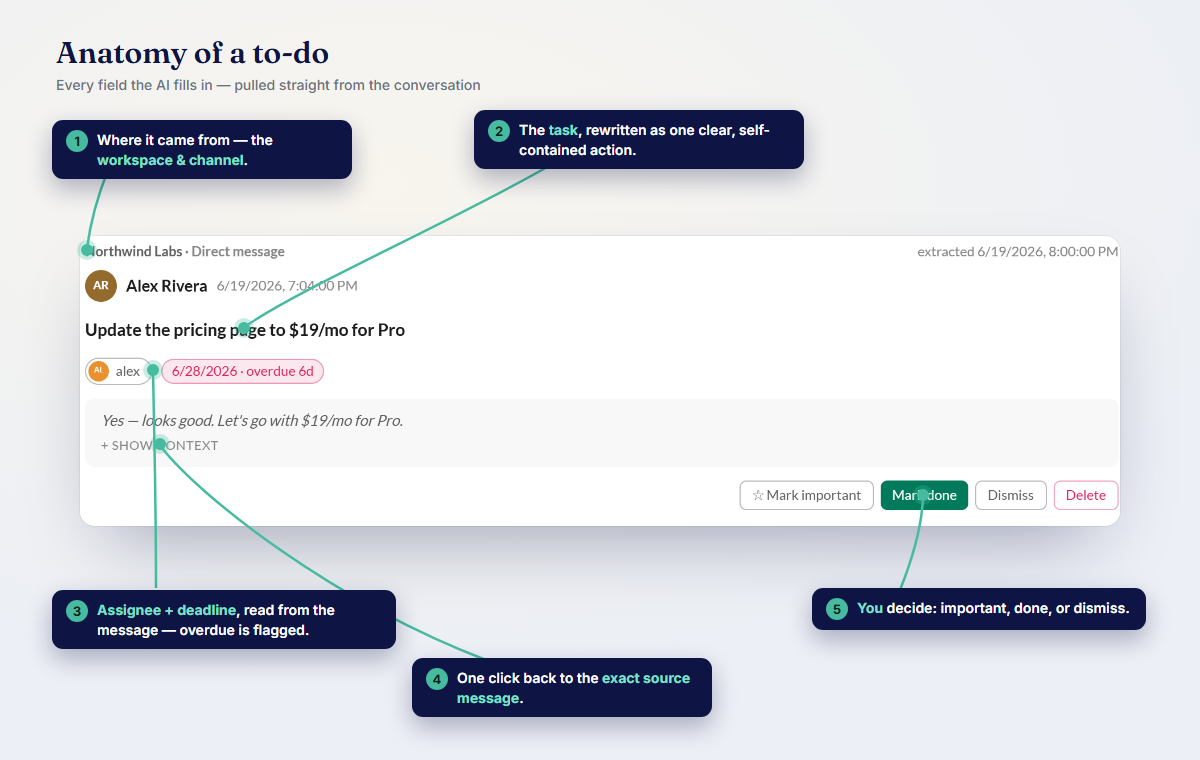
Every item comes back phrased the way you actually said it, with a straight path to where it happened. Something look off? One tap reopens that original exchange in full context — so instead of "wait, did I really say I'd do that?" you just go read it. That traceability is the difference between a list you trust and a list you second-guess.
Aim it wherever your loose ends live: take in your whole history in one pass, or narrow it to the handful of DMs and threads where your promises actually get made — whichever fits how you work.
You decide what matters — the app won't
This is the part we're stubborn about: Empowia surfaces your open items but refuses to rank them. No blaring "URGENT" stamp, no reordering of your day, no invented priority score. That restraint is deliberate — the app has no idea which promise is to the person you can't let down, or which "I'll double-check the numbers" is quietly blocking a deadline. Only you know that.
So you star what's important yourself. The app's job is to make sure nothing vanishes; deciding what deserves your attention today stays where it belongs — with you.
Quietly, and only for you
None of this leaves your laptop. Your conversations, the list it builds, your Slack sign-in — all of it stays on your own computer, with no cloud and no account. The AI reading your messages uses your own key, and on Google Gemini's free tier, keeping it up to date can cost nothing at all.
Stop carrying it all in your head
Everything you owe, and everything you're owed, is already sitting in your Slack — you just can't see it under the scroll. Empowia turns it into one tidy list you can actually work from, each item traceable back to the instant you said it.
Download it free and run To-dos on your noisiest conversation. Wrangling a whole team's follow-ups instead of just your own? There's a team version of this idea. On Mac or Linux? You can get notified when it's ready.
FAQ
How do I keep track of things I promised in Slack without a to-do app?
Run Empowia's To-dos over your own conversations. It gathers the promises you made — the "I'll handle it" moments — each linked back to where you said it, so nothing you promised quietly disappears.
Can it also show what other people promised me?
Yes. Because it reads both sides of your conversations, To-dos surfaces the follow-ups owed to you as well — the file someone said they'd send, the answer you're still chasing — so you can chase them without scrolling or nagging from memory.
Does the AI decide what's urgent for me?
No, on purpose. It surfaces every open item but never ranks them or invents urgency. You mark what matters, because only you know which promise you can't afford to break this week.
Comments
Loading comments…