Edit Any HTML File, Visually
The lightest, easiest way to edit an HTML file — open it and change anything visually or in code, no install and no coding needed (easier than a word processor). Free online, or download the single-file app. Great for existing pages, including ones made by AI.
* The desktop app is one .html file — open it and your browser becomes the editor.
- No install
- No sign-up
- Nothing leaves your browser
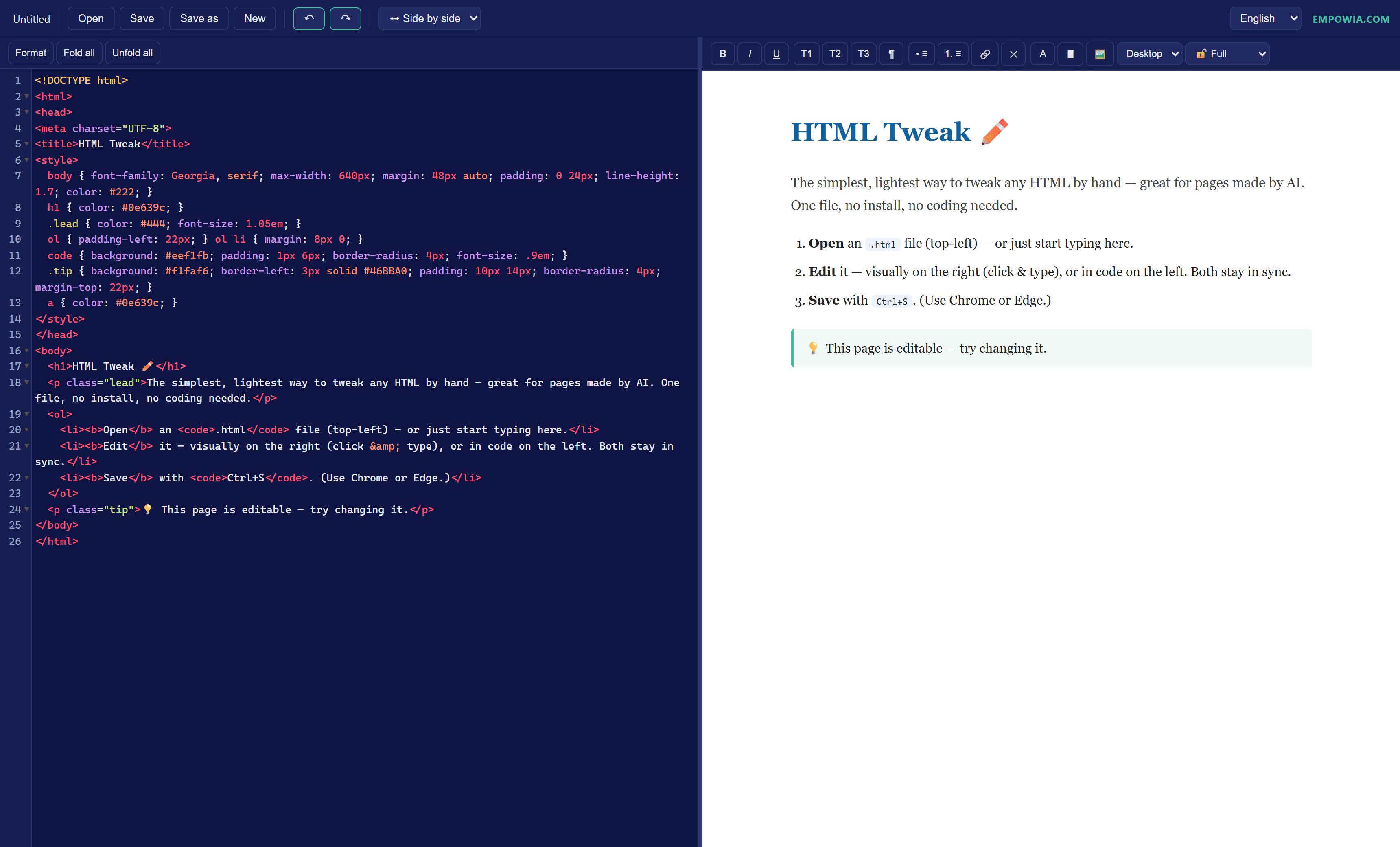
You asked AI for a page and it came back 95% right. The last 5% — a typo, a colour, a link, an image that’s too big — shouldn’t need another round of chatting with a bot. Open the file and fix it yourself, in seconds.
That’s the whole idea.
HTML Tweak vs the usual options
Most “HTML editors” are code sandboxes, heavy installs, or paid tools. Here’s where HTML Tweak actually differs — no spin.
| HTML Tweak | W3Schools | PlayCode | CoffeeCup | Pinegrow | |
|---|---|---|---|---|---|
| Edit your existing .html file | |||||
| Visual — no coding | |||||
| Price | Free | Free | Freemium | Free / $29 | Paid |
| Works online and offline | |||||
| No sign-up |
A real editor, in one file
Everything you need for a quick edit — and nothing you don’t.
Two ways to edit, always in sync
Edit visually on the right (click and type like a document), or edit the code on the left. Changes flow both ways.
Live preview
See the result as you type — no build step, no refresh.
Click to locate
Click anything in the preview and its code lights up on the left, so you always know where you are.
Editing protection
Choose Full, Ask-first, or Text-only. Text-only lets a non-coder change the wording without ever breaking the layout.
Opens & saves real files
Open and save local .html files directly in Chrome or Edge — or upload and download anywhere else.
Five languages
English, 中文, Français, 日本語 and Deutsch — switch anytime.
Change the words. Never break the layout.
Editing protection is the trick. In Text-only mode you can rewrite any copy while the structure stays locked — so a teammate who has never seen HTML can update a page without fear. Coders switch to Full mode and edit anything.
A real app — without the weight.
Prefer not to depend on a website? Download HTML Tweak as a single .html file — that file IS the app. Double-click to open it; it runs on your own machine, offline. Lighter than traditional software, easier than a word processor, and you never touch code. Not a cut-down version — every feature is in that one file.
The whole app in one file
No installer, no folder of assets — the entire editor is a single .html you can keep anywhere.
Runs on your computer
It works offline after the first load, with no server. Your files are opened and saved locally and never leave your machine.
Safe to keep and share
It’s a plain HTML file — nothing installed, no background process, no silent auto-updates. Inspect it, copy it, drop it on a USB stick.
Full-featured, not a demo
Exactly the same two-way editing, live preview, protection modes and languages as the online version.
Three steps
- 1
Open
Open an .html file — or just start typing. Use it online, or download the single file and double-click it.
- 2
Edit
Tweak it visually on the right or in code on the left. Both stay in sync, with a live preview.
- 3
Save
Press Ctrl+S to save straight back to your file (Chrome/Edge), or download the result.
Nothing is uploaded
HTML Tweak runs entirely in your browser. Your files never touch a server — no account, no cloud, nothing to sign up for. Download the single file and it keeps working offline.
100% local
Your HTML is opened and saved on your own machine, never sent anywhere.
No account
No sign-up, no login, no email. Open it and go.
Yours to keep
It’s one file. Download it and it runs offline, forever.
Questions
Is it really free?
Yes — completely free, no sign-up, no limits. It’s an open-source single file, made by Empowia. A free HTML editor with no catch.
Is it an online editor or an app I download?
Both, and both are free. Use it as a free online HTML editor in your browser, or download a single .html file that is the whole app and runs on your own computer — same features either way.
Do my files get uploaded anywhere?
No. Everything runs in your browser and stays on your computer. HTML Tweak has no server and no account.
Which browsers work?
Any modern browser works. For opening and saving local files directly, use Chrome or Edge; other browsers fall back to upload and download.
Can someone who doesn’t know HTML use it?
Yes — that’s what Text-only mode is for. You can rewrite any wording while the layout stays locked, so nothing breaks.
What is it best for?
Quick, last-mile fixes to HTML — especially pages generated by AI: a wrong word, an off colour, a heading, an image URL. Edit it directly instead of prompting a bot again.
Can I use it offline?
Yes. Download the single file and it works offline after the first load. There’s nothing to install.
Is HTML Tweak good for complete beginners?
Yes — that’s who it’s for. You edit the page by clicking and typing, like a document, with no coding at all. Turn on Text-only mode and you can change the words without any risk of breaking the layout. If you can use a word processor, you can use this.
Fix that AI-made page in seconds
Open it in your browser, or keep the single file for later. Free, no sign-up.