The little tasks your team buries in Slack — and how a lead keeps them all moving
Big work gets a ticket. The small stuff — 'can you resize that', 'ping the vendor', 'recheck staging' — just gets said in a channel and forgotten. Here's how a team lead can track every one of those little tasks without opening a project tool.
The Empowia Team

Your project tool has the epics, the sprints, the roadmap. What it doesn't have is the steady stream of small tasks your team actually spends its days on — the "can you tweak the header," the "did anyone ping the vendor," the "recheck the staging build before we ship." Each one is too minor to earn a ticket, so it never gets one. It gets said, in a channel, and then it gets buried.
For whoever is running the team, that's the stuff that quietly derails a week. Not the big deliverable everyone is already watching — the ten little tasks nobody wrote down, one of which turns out to be holding up the launch.
Small tasks don't fit a project tool — so they live in chat
Opening Jira to log "resize the banner by 3pm" feels absurd, so nobody does it. The task stays in Slack as a sentence, collects a 👍, and rolls out of view. There is no lightweight spot between a full ticket and hope someone remembers — and that missing middle is exactly where a team's small tasks go to die.
A lightweight tracker, built from what's already said
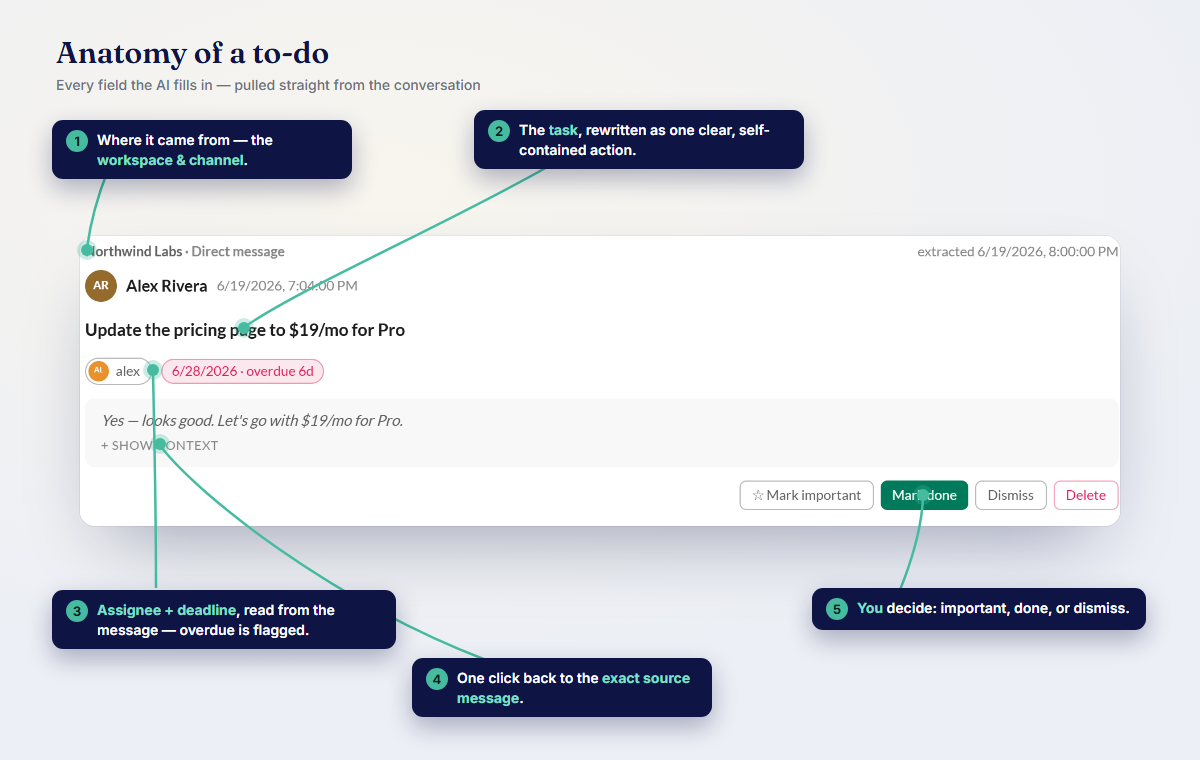
Empowia for Slack's To-dos view reads across your team's channels and pulls those small tasks into one simple, sortable list — each attributed to the person picking it up, with a due time if a date was mentioned. Nobody writes a ticket; the tracker assembles itself from the messages your team already sends.
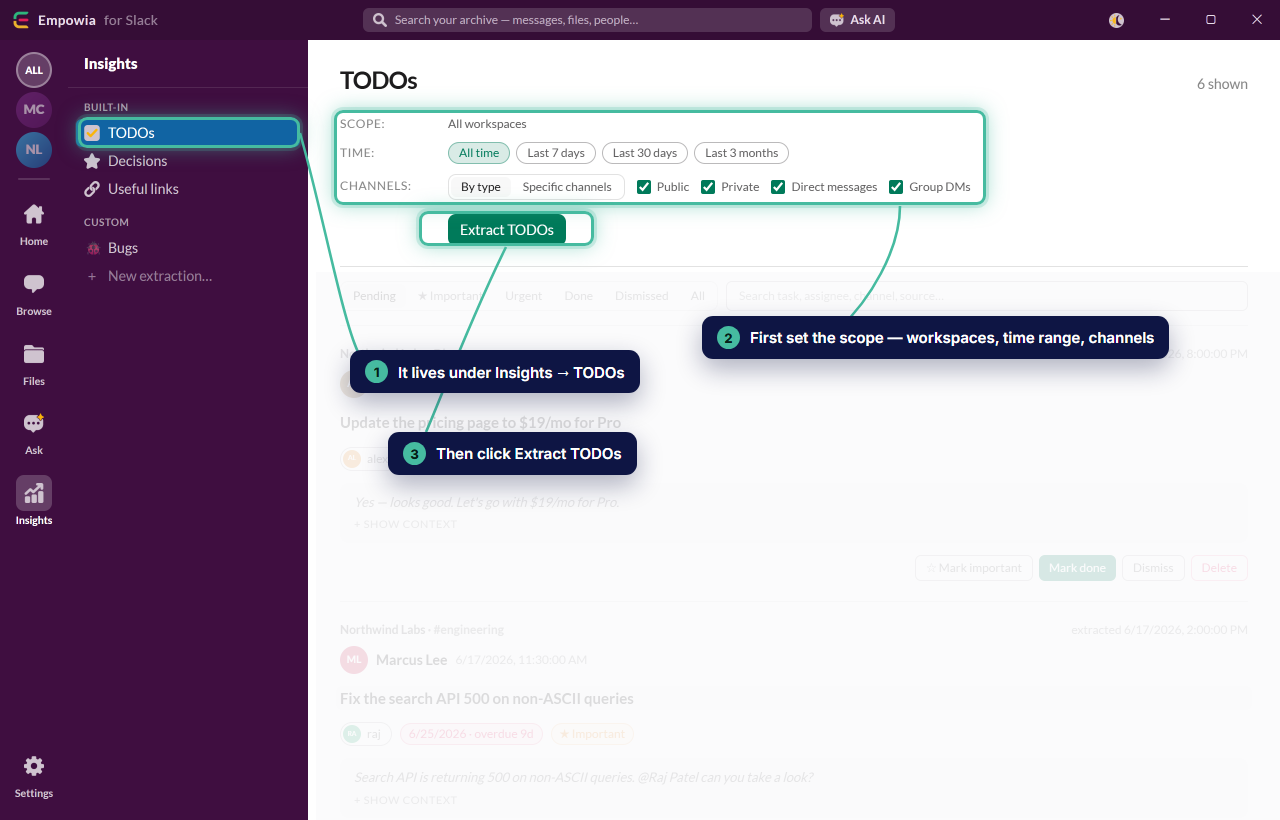
For a lead, that turns a dozen scattered channels into a single view of the little stuff in flight — what is moving, who picked it up, and what has quietly gone stale.
Keep the list live so it runs itself
Set To-dos to sweep your team's channels on a schedule and the small tasks land on the list as they are mentioned — no one has to remember to log anything. Your check-in stops being "what did everyone pick up this week" and becomes a glance at a list that is already up to date.
Want to track a specific slice — only the work aimed at the design squad, say, or everything tagged for this week's release? Describe it once as a custom extraction and Empowia keeps that view filled in on its own.
A tracker, not a tripwire
None of this centralizes your team's chat. Empowia runs on each person's machine and reads only the channels they can already open — no shared server, no admin console, nothing syncing anywhere. It exists to keep the small tasks moving, not to watch the people doing them.
Stop losing the small stuff
The little tasks are the ones that slip, precisely because they are too small to file. Empowia gives them the lightweight home they never had — pulled from the messages your team already sends, and kept current on its own.
Download Empowia free and point To-dos at your team's busiest channel. Just juggling your own small tasks? There is a personal version of this.
FAQ
How can a team lead track small tasks that never make it into Jira or Asana?
Run Empowia's To-dos across your team's channels and it pulls the small in-chat tasks into one list — each attributed to the person handling it, with a due time when one was mentioned and a jump back to the message. It's a lightweight tracker that builds itself, with no tickets to write.
Isn't this just another project management tool?
No — it sits below your project tool. Epics and sprints stay in Jira or Asana; To-dos catches the small tasks that are too minor to log there but still slip through, straight out of the conversations where they're assigned.
Can the whole team see one shared task list?
Each person runs Empowia on their own machine over the channels they can already access. There's no shared server — it's a way for a lead to keep the small tasks moving, built from messages, not a central dashboard watching everyone.
Comments
Loading comments…