How to capture decisions from Slack (and find every link people share)
Decisions and links are the two things teams lose most in Slack. Here's how Empowia's AI Insights round up a running Slack decision log and a tidy library of every URL — each one linked back to the message it came from.
The Empowia Team

Ask any team where their important stuff lives and they'll say Slack. Ask them to find something specific in Slack — the decision you made about pricing, the doc someone dropped last Tuesday — and watch the scrolling begin.
Two things vanish into the scroll more than anything else: the decisions a team makes, and the links people share. Both matter for weeks or months. Both are buried under a thousand "sounds good" and "on it" messages within a day.
Here's how to get them back automatically.
The 4pm-Friday problem
Picture a small product team on a busy channel. Over two weeks they hash out a new pricing model — a few threads, a couple of tangents, one heated exchange about annual vs. monthly. Somewhere in there they landed on an answer. Someone also shared a Google Doc with the final numbers, and a competitor's pricing page for comparison.
Now it's Friday afternoon and a new teammate asks the obvious question:
"What did we actually decide about the pricing model — and where's that doc someone shared?"
Cue ten minutes of scrolling, three "I think it was in #product?" guesses, and a half-remembered keyword search. The decision was made. The link was posted. They're just lost in the scroll.
This is exactly what Empowia for Slack is built to fix. Once your workspace is backed up on your own computer, its AI Insights read the whole archive and surface the things you actually need — starting with two built-ins, Decisions and Links.
Capturing decisions automatically
Decisions does one job well: it sifts your backup for the calls your team made and holds on to the surrounding context, so each decision still makes sense weeks later.
Instead of a bare line like "go with monthly," you get the decision and the why — the trade-off that was weighed, the alternative that got rejected, the thread where it all happened. That context is the difference between a note you trust and a note you have to go re-verify.
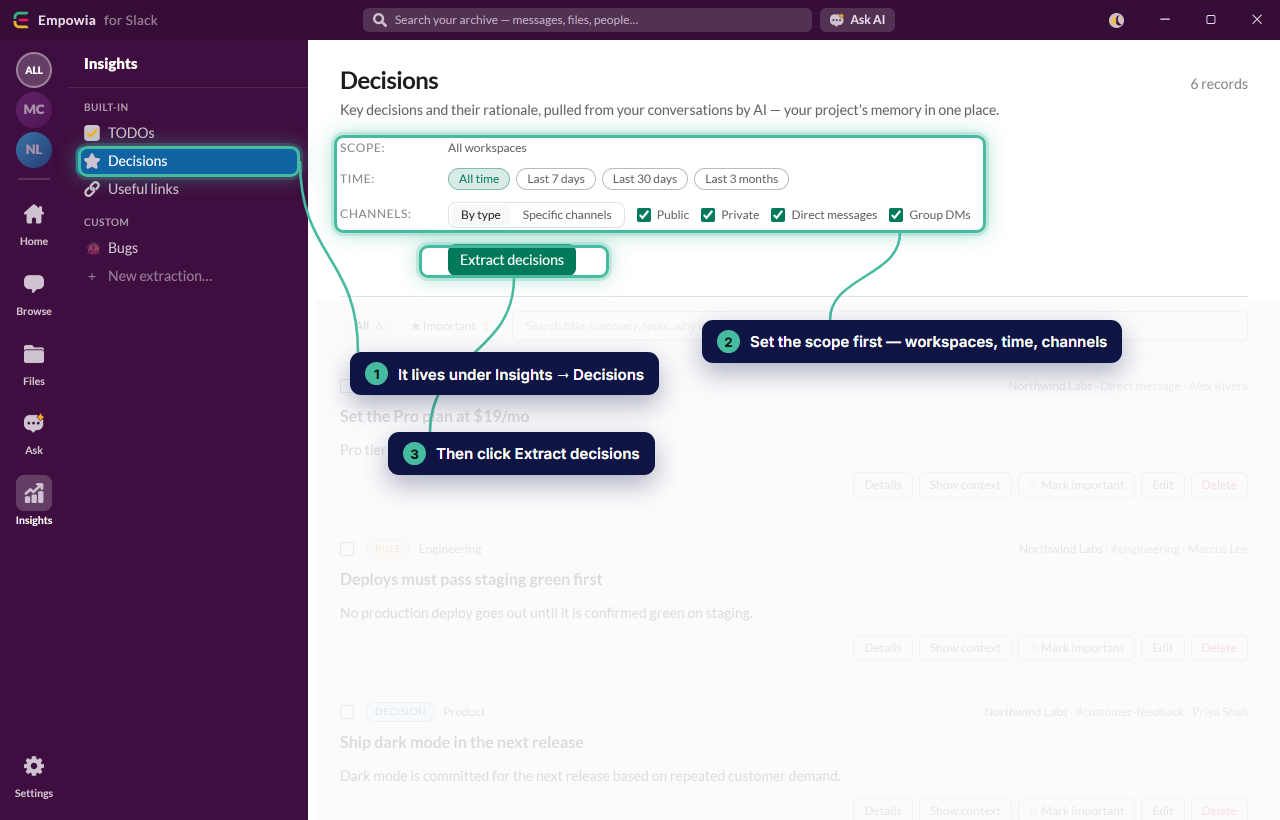
To run it:
- Open your backed-up workspace in Empowia and go to Insights.
- Choose Decisions. Optionally scope it to a single channel
(say,
#product) so you're not mixing in unrelated calls. - Run it. Empowia sends the relevant messages to your AI provider and returns a clean list of decisions.
The best part is what happens when you review them. Every decision Empowia rounds up links back to its source message. See one that looks surprising? Click through to the exact thread it came from and read the full back-and-forth. No guessing whether the AI got it right — the receipt is one click away.
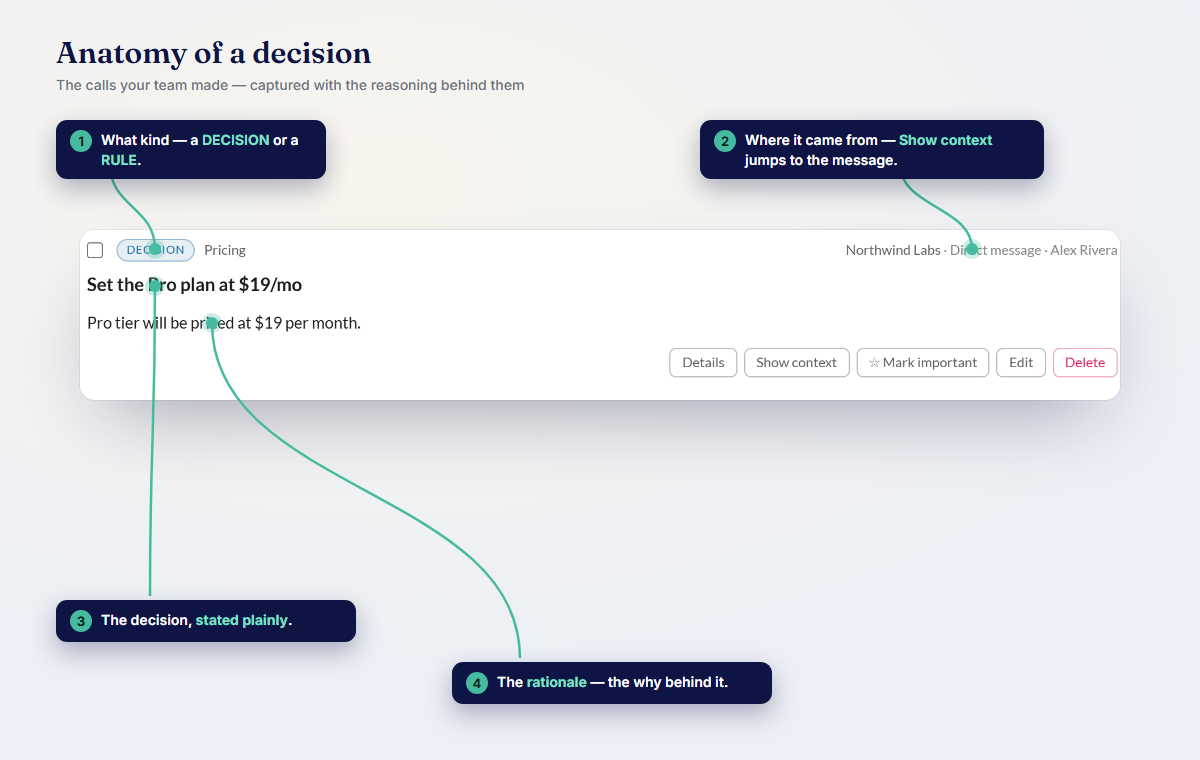
Run this across your whole history and you've got a Slack decision log that took you about a minute to build, not an afternoon of archaeology.
A tidy library of every link
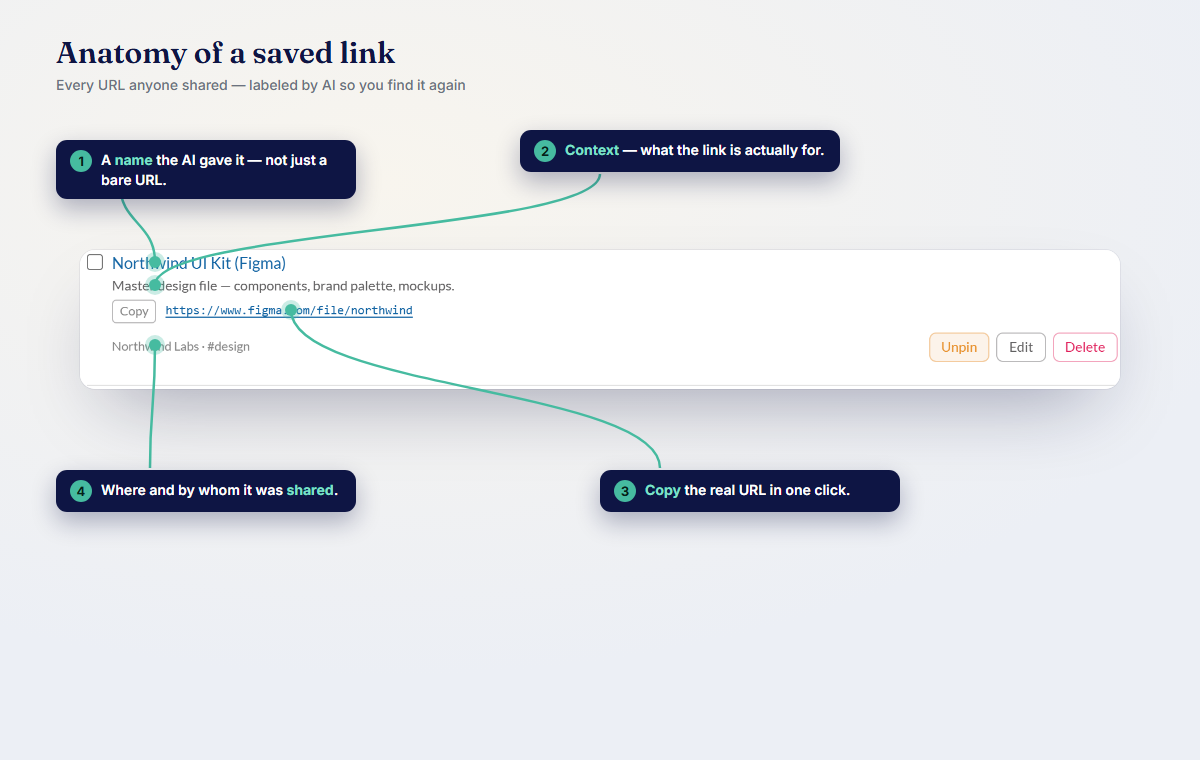
The other thing teams lose is links. Someone shares a doc, a Figma file, a spec, a competitor page — it's useful for exactly as long as it's on screen, then it's gone.
Links gathers every useful URL shared across your archive into one place. No more "who posted that doc?" and no more scrolling three weeks back hoping you'll recognize it. It's just a list — and, like your decisions, every link points back to the message it was shared in, so you get the context around it: who shared it, when, and what they said about it.
Scope it to a channel and you effectively get a reading list for that project. Point it at everything and you get your team's entire shared-link library, searchable in one view.
Keep the log always-current
Decisions and links don't stop arriving, so a one-time pass goes stale. Two things keep yours living:
- Schedule it. Set Decisions and Links to run on a schedule. Your decision log and link library refresh themselves as new messages come in — you just check back, you don't re-run anything by hand.
- Describe your own. Beyond the built-ins, you can tell Empowia exactly what to watch for. Want a running list of "commitments to customers," "open risks," or "anything tagged as blocked"? Write a custom extraction in your own words and Empowia flags it the same way, with the same source-message links.
Together, scheduling plus a custom extraction or two turn a static backup into an always-current record of what your team decided and what it shared.
This all stays on your computer
Because this is your team's real decision-making, privacy isn't a footnote.
- 100% local. Your backup, your files, and your Slack sign-in never leave your own computer. Empowia has no cloud, no accounts, and no telemetry.
- Bring your own AI key. Insights use your own key for Gemini, Claude, or OpenAI. You see the cost per answer before you spend anything, and nothing routes through us.
- It can cost nothing. Gemini's free tier means running Insights can be genuinely free — a real decision log and link library for $0 in AI spend.
The only data that ever moves is the specific text you choose to send to your own provider. Everything else stays put.
Stop losing the good stuff
Your team already made the decisions and already found the links. They're sitting in your Slack history right now — you just can't see them under the scroll. Empowia's auto-insights surface them, keep them current, and always point back to the original message so you can trust what you're reading.
Download it free and turn Empowia loose on your own workspace with Decisions and Links — the free app covers up to 20 conversations, no account, no cloud.
While you're at it, you can turn Slack into a to-do list so nothing slips, or ask your Slack anything and get answers with citations.
FAQ
How do I capture decisions from Slack automatically?
Point Empowia's Decisions feature at your backup (or a single channel) and it sifts the archive for the calls your team made, along with the surrounding context. Each decision links back to the original message, and you can re-run it on a schedule to keep a living Slack decision log.
Can I find all the links shared in a Slack channel?
Yes. Insights → Links gathers every useful URL shared across your history into one place, so you don't have to scroll or guess who posted "that doc." You can scope it to a specific channel, and each link points back to the message it came from.
Does capturing decisions send my Slack data to the cloud?
No. Empowia runs 100% locally on your own computer. The only thing that leaves your machine is the specific text you send to your own AI provider using your own key — and with Gemini's free tier, that can cost nothing.
Comments
Loading comments…