Ask Your Slack History Questions — With Sources to Check
Can't remember how your team made a decision? Ask your saved Slack history in plain language, get a cited answer and check it against the original messages.
The Empowia Team

Quick answer
Use full-text search when you remember a name or phrase from Slack. Use Empowia for Slack's Ask feature when the answer spans several archived messages and you want a written response with citations back to the source. Read those messages before relying on the summary. Empowia stores the backup locally, but Ask sends your question and relevant message context to the AI provider you choose using your own key. For recurring reports or lists, scheduled custom AI extraction is a different workflow.
Key takeaways
- Local full-text search is often faster for an exact phrase, filename clue or message you already recognize.
- Ask can write an answer to a natural-language question about backed-up Slack conversations and cite the source messages.
- A citation makes a claim checkable; it does not guarantee that an AI summary is complete or correct.
- Bring your own AI key. Relevant messages go to the provider you select, while the local backup remains on your computer.
- Use scheduled custom AI extraction for repeated information gathering, and read-only MCP access when querying from a supported external client.
A Slack search for an unusual word is easy. A question like “why did we change the refund wording?” is not. There might be no message that says “here is why.” The answer could be three comments in a product channel, a reply from support and a decision made a week later.
I've lost more time chasing those conversations than I care to admit. That's why I like the idea of asking my saved Slack history a question. But I don't use AI for everything. Sometimes a search box is quicker, cheaper and easier to verify.
when Slack search is already the right answer
Suppose I remember the phrase “approved for Friday.” I'd search for those words. Same if I know a teammate's name or a particular project term. Empowia has local full-text search over its backed-up Slack archive, so I can use the words I remember to get back to messages without asking an AI model to summarize anything.
That is a feature, not a limitation. Search gives me the original conversation to read for myself. I don't have to wonder whether a summary skipped a caveat. For a single quote, source message or exact wording, the simplest tool is often the right one.
Where search starts to feel slow is when I remember the question but not the words anybody used. “What made us postpone that launch?” could have been discussed as a bug, an approval, a dependency or a design issue. I may have to find several messages, read each thread and piece together the timeline.
That's the point where I'd switch tools. Not because AI magically knows more, but because summarizing several relevant messages is a different job from finding a keyword.
ask your Slack archive a real question
Empowia for Slack can back up public and private channels, DMs and group DMs that my account can access. Its Ask feature lets me ask a natural-language question about that saved history and receive a written answer with citations to the source messages.
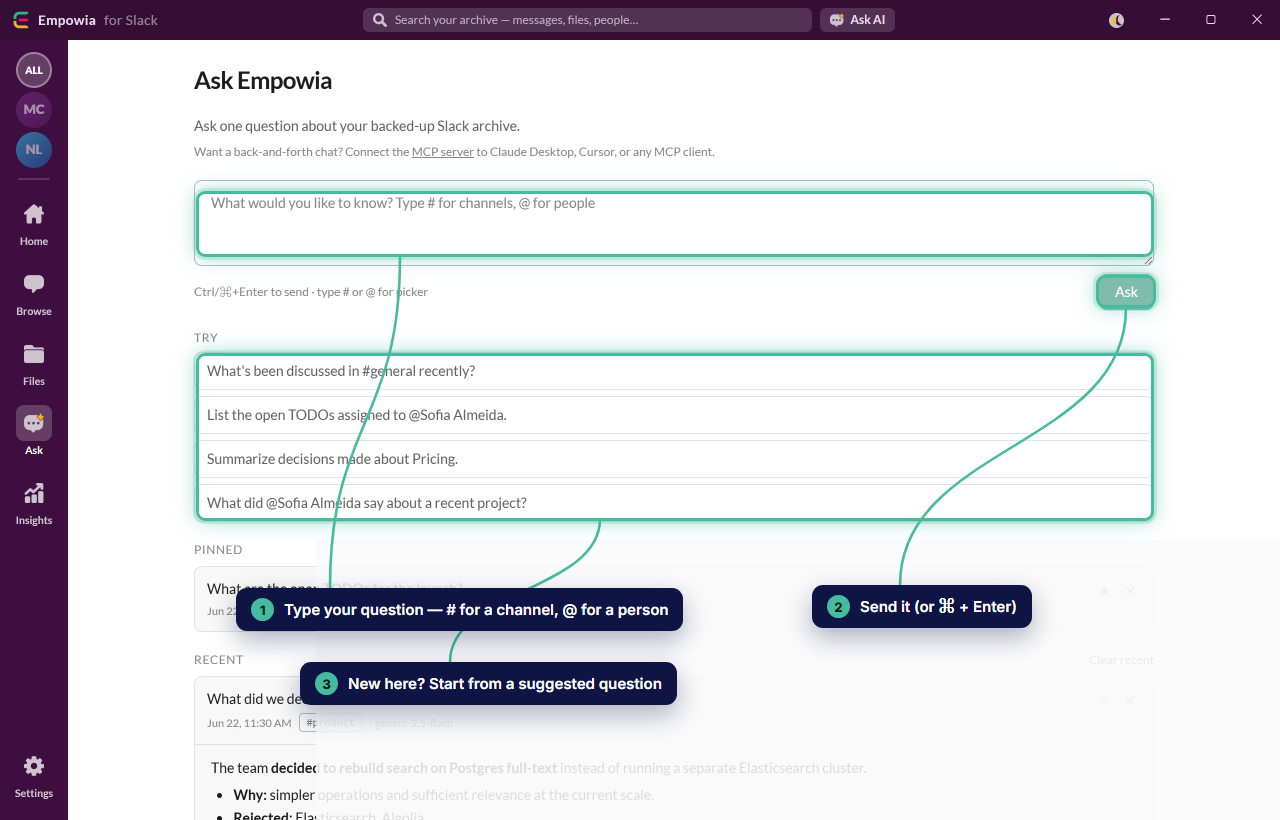
I try to make the question about a real decision or piece of work, not something impossibly broad. “What did we agree about the refund window?” is useful. “Summarize everything interesting in Slack” is too vague for me to know what an answer should contain.
Another good question might be, “What concerns did the team raise before we changed the checkout?” That invites an answer that brings together different remarks rather than hunting for a single string. If I need to know what was said on a particular date, I'll still check the original messages.
An important boundary: this is about the history I have already backed up, not a claim that Ask can reach messages outside the archive, private conversations I couldn't access, or a live workspace beyond my saved copy.
The best prompt isn't the cleverest one. It's the one whose answer I can actually check.
a cited AI answer is a lead, not a verdict
This is the feature that makes Ask more useful to me than an unreferenced chatbot answer: the response comes with citations back to Slack messages. I can go from “the team delayed the release because the payment test failed” to the conversation on which that conclusion was based.
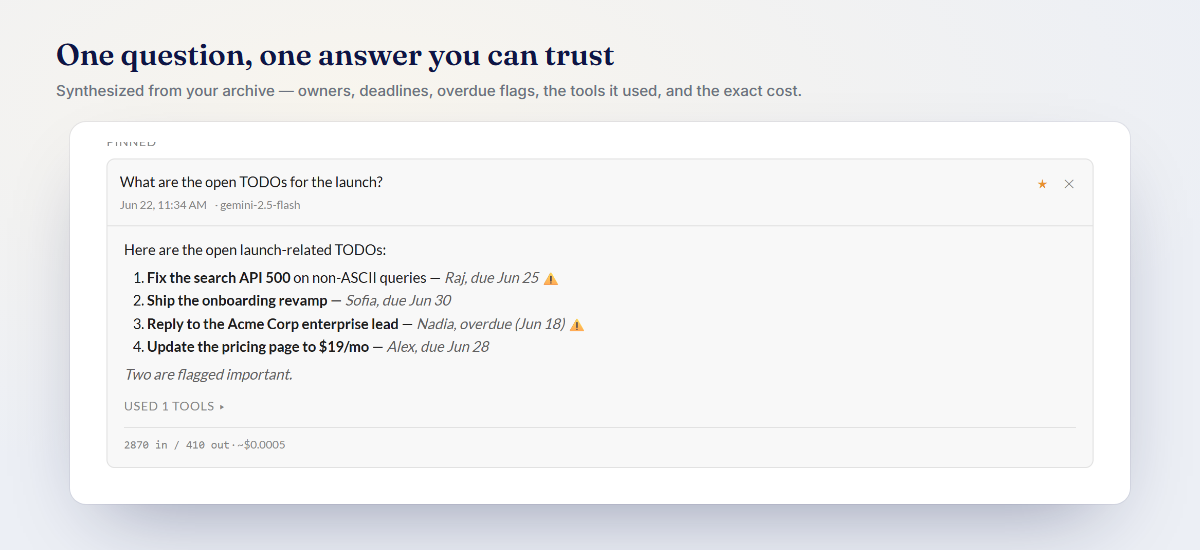
But I wouldn't say “every citation makes the answer true.” A model can misread a conversation, mix up who made a decision or omit a later correction. A linked source is an invitation to verify, not a stamp of certainty.
Here's how I use it. I read the proposed answer, then follow the cited messages for the statements that matter. If the question is about a deadline, I check whether it was a proposal or a final agreement. If it's about why a choice was made, I look at the messages before and after the quoted one. If the evidence doesn't support the summary, I keep reading rather than treating the answer as settled.
A citation is most valuable when it saves the time needed to find the evidence while still letting me inspect the evidence myself.
what actually leaves your computer when you ask
“Private Slack archive” and “AI never sees Slack data” are two different claims. Empowia stores the backup, files and Slack sign-in on my computer. Local full-text search uses that saved archive. But when I use Ask, the prompt and the relevant message context go to the AI provider I choose.
I bring my own API key — for example, one from Google Gemini, OpenAI, Anthropic or OpenRouter. There's no Empowia cloud server in between. That doesn't make the request offline: the selected provider receives the information needed for the question. I decide whether I'm comfortable sending that context to that provider before asking about sensitive work.
The provider charges according to its own rates, and Empowia shows an estimated cost for each answer. I wouldn't describe a question as guaranteed free just because a provider offers a free tier: eligibility, usage and provider terms matter.
For everyday searches, this is another reason I start with local full-text search. I reserve AI for the questions where synthesis is worth the extra step and I know what I'm choosing to send.
ask once, or extract on a schedule?
There is a point where asking the same question again and again stops making sense. Imagine every Monday I need a list of small tasks that came up in the team's Slack channels. Or I want to collect decisions and links relevant to a particular project.
That's not really a one-time question. Empowia supports AI extraction of to-dos, decisions and useful links, plus custom extractions that can run on a schedule. Those workflows turn repeated information gathering into something more structured. They also send relevant message context to the AI provider you choose, just as Ask does.
So my dividing line is practical. Ask when I need one answer and want to read its supporting messages. Full-text search when I already remember identifying words. Custom scheduled extraction when I have a recurring, well-defined set of information to collect.
If the last case is yours, setting up a custom Slack AI extraction is the next guide. If you're a team lead trying to follow up on small assigned tasks, tracking the little tasks in Slack shows that narrower use case.
The word “AI” appears in all three workflows, but the reader's job is different in each one.
asking inside Empowia versus using MCP
One more distinction matters if you already spend your day in a developer's AI tool. You may want to ask about your archived Slack messages from another application instead of from inside Empowia.
Empowia has an MCP server that exposes its archived data through read-only tools to supported MCP clients such as Claude Desktop and Cursor. That is a separate way to access the local archive. It isn't the same thing as Ask's in-app question workflow, and “read-only” does not mean the client can edit or restore messages in Slack.
I wouldn't expect a reader who just wants one answer to configure an MCP client first. Start with the simpler path. If you're already working with an MCP-compatible tool and specifically want that integration, read about read-only access to your Slack archive through MCP instead.
Different door, same need to understand which tool is seeing which data.
my test before I trust an AI answer
Before I use a response in a status update, I run one small check. I ask a question whose answer I partly remember. I read the reply, open its cited messages and see whether they really say what the summary claims. Then I try a second question with a different phrasing and inspect the relevant evidence again.
I'm not looking for a perfect performance score. I'm checking whether I can follow the trail back to the conversation, because that's what makes an answer useful when someone asks, “Where did we decide that?” If the reference is thin or the summary sounds too confident, I go back to the messages.
You can try the workflow with Empowia for Slack. The full app is free for up to 20 conversations, and the local archive stays searchable without having to buy an unlimited license. Bring an AI key when you want to use Ask, and remember that the provider receives the relevant context you send.
The result I want isn't a chatbot that sounds certain about my team's past. It's a faster route to the right messages, with enough evidence that I can decide what actually happened.
FAQ
Is asking my Slack archive different from searching it?
Yes. Local full-text search finds matching messages. Ask uses AI to write a response to a question and provides citations back to source messages. Search first when you already know a distinctive phrase.
Can I verify what the AI says about my Slack history?
Empowia's AI answers include source citations. Open the original messages and review their context; a source citation helps you check an answer but doesn't guarantee the summary is correct or complete.
Does Ask send my Slack messages to an AI provider?
Yes. The backed-up archive remains on your computer, but your prompt and the relevant context needed to answer it are sent to the AI provider you choose using your own API key. Empowia does not route it through an Empowia cloud server.
What does it cost to ask an AI question?
You bring your own API key and pay the provider according to its rates. Empowia shows an estimated cost for each answer. Available providers include Google Gemini, OpenAI, Anthropic and OpenRouter.
When should I use scheduled extraction instead of Ask?
Use Ask for one question you need answered now. For information you want collected repeatedly, Empowia supports custom AI extractions that can run on a schedule.
Comments
Loading comments…