How I Turn Slack Chat History Into a Self-Updating Project Tracker
The plan is in a Slack channel. The delay is in a DM. I had my AI agent read Slack and turn progress, blockers and date changes into a project report I can check any time.
The Empowia Team

Quick answer
The hard part of managing projects in Slack isn't the talking. It's getting the decisions, tasks, deadlines and blockers scattered across channels, DMs and threads into the plan. For a task list the whole team maintains, use Slack Lists. If you don't want to chase everyone to update it, back up your messages with Empowia for Slack and give Claude Code or Codex the free Project Pulse skill. You get a local project report where every item links to its source message, with alerts and a Gantt chart.
On Monday morning I open #launch. The developers say it'll be ready for testing this week. Everything looks fine.
At the same time, the designer is waiting in a DM for me to approve a revised mockup, and in a group chat the supplier has just said delivery may slip by a week. Neither of those made it into #launch.
Projects rarely go wrong because nobody talks about them. The talk is there. It's just spread across three places, and none of it reached the plan.
the trouble with task lists: someone has to update them
There are two usual fixes. One is a shared task list, such as Slack Lists, Jira or Asana, so everyone can see who owns what and when it's due. The other is a standup bot that asks everyone each day what they did, what's next and what's in the way.
Both work. If your team already keeps a list in good shape, I wouldn't tell you to replace it. But both depend on someone copying what changes in conversation into the list. "Still waiting for your reply" in a DM, "might be late" in a group chat: if nobody moves them over, the list stays stuck at last week.
And the person moving them over is usually you.
so I let an agent read Slack instead
I handed that job to my own AI agent.
There are three pieces. Empowia for Slack backs up your Slack messages to your computer, DMs and group chats included. Claude Code or Codex reads that backup over a read-only connection (MCP), so nothing gets posted to Slack. And Empowia Project Pulse is a free, open-source skill I wrote that tells the agent how to find projects, follow their progress and build the report.
What you end up with is a few local project files and an HTML report you open in your browser. Your teammates don't install anything, and you don't need a Slack admin.
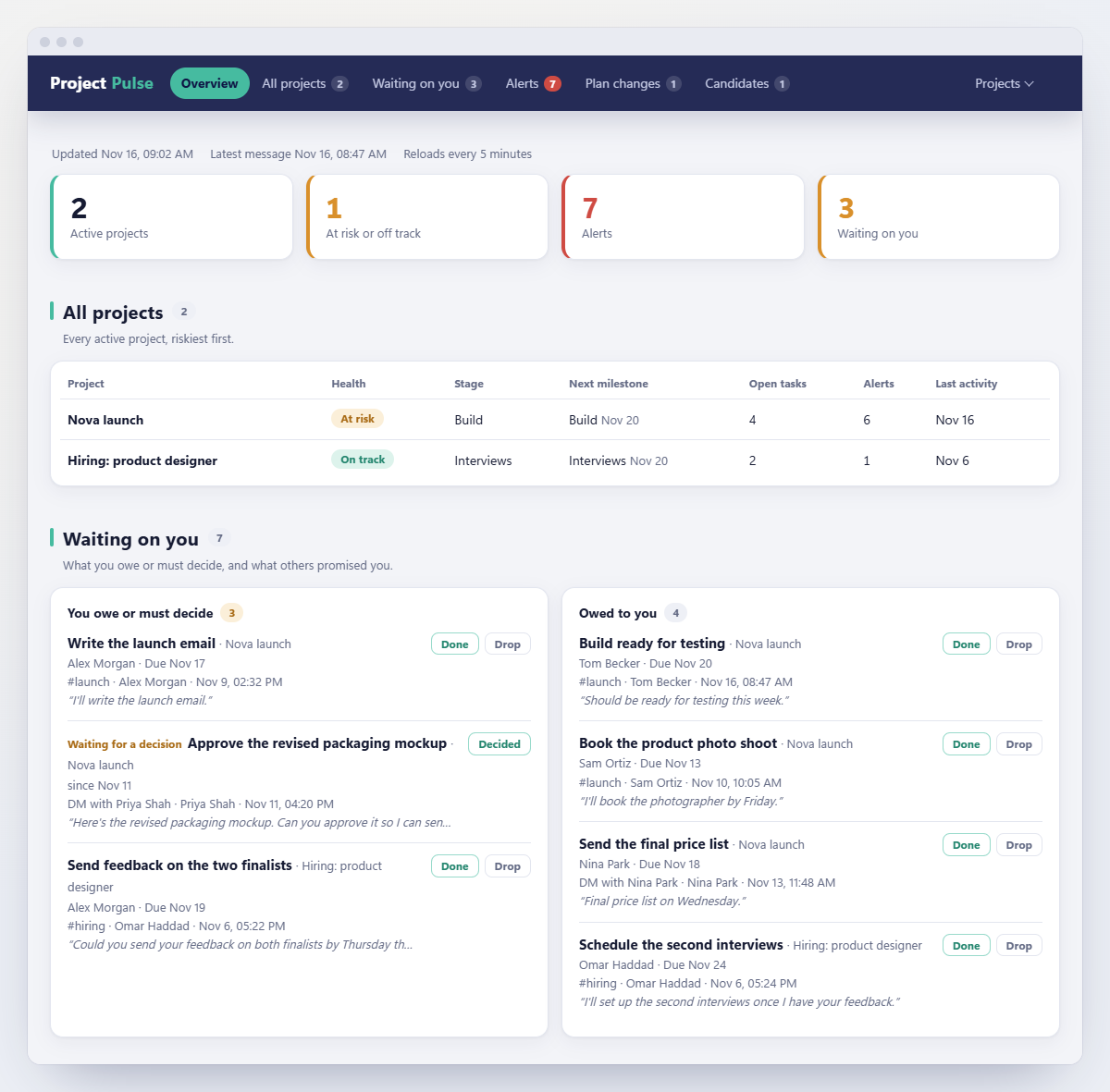
Let's take that launch from the start.
first, let it find the projects
You don't have to list your projects first. Tell the agent "find my projects", and it goes through your recent Slack messages, suggests a few things that look like projects and shows the messages behind each guess.
You decide what counts. When I tried it on my own Slack, I set up only two: a hiring round and a product launch. The rest could wait. I'd start with one or two as well. Track everything at once and you'll soon stop reading the report.
then agree on the plan in a short chat
Setting up a project is a conversation, not a form. For this launch, the agent might suggest four stages: design → build → review → launch. You fix the milestones and dates.
The important part is agreeing on what the end of each stage sounds like in Slack. "The client approved the design" closes the design stage. "It's on staging" moves the build into review. These are examples, not exact phrases to match. The clearer you make them, the easier the agent's calls are to check later.
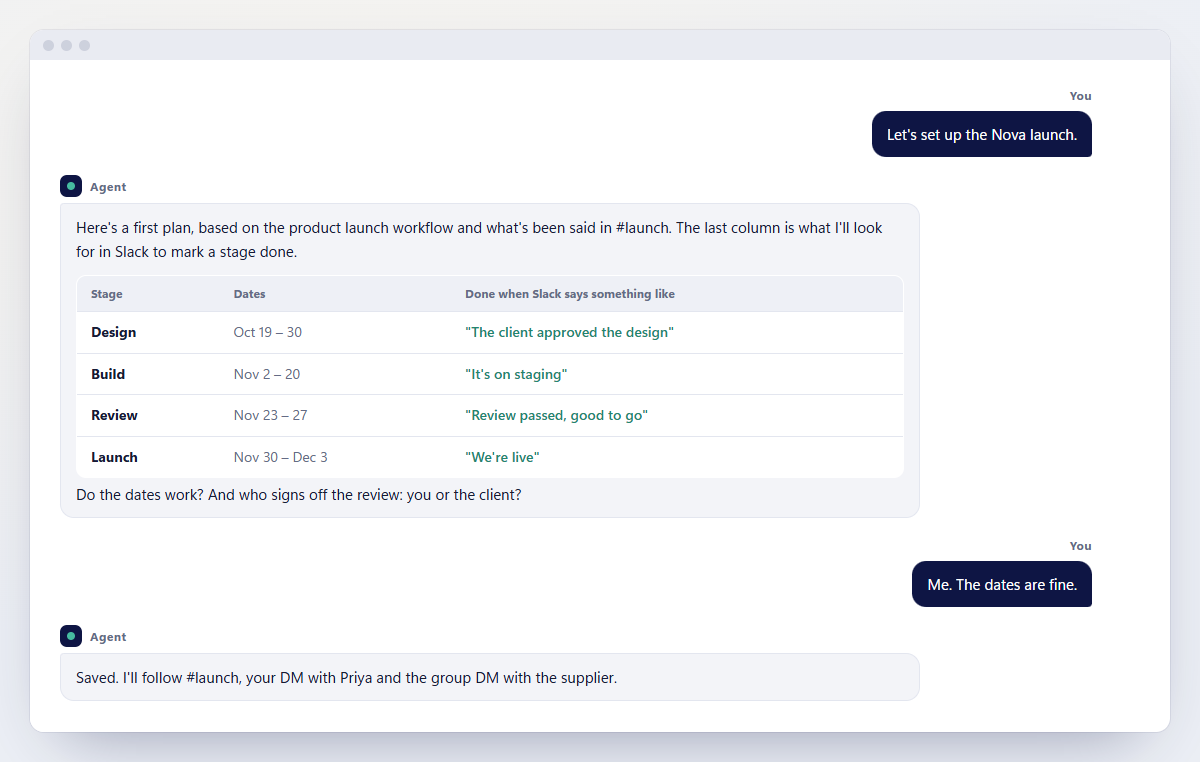
Once the workflow is set, the next launch can reuse it.
the next Monday morning
With the project set up, the next time you have a Monday like that one, you don't go through the channel, the DMs and the group chat one by one. You open the report:
- The launch's health will probably show At risk, with one line saying why.
- The mockup waiting for your approval is under Waiting on you.
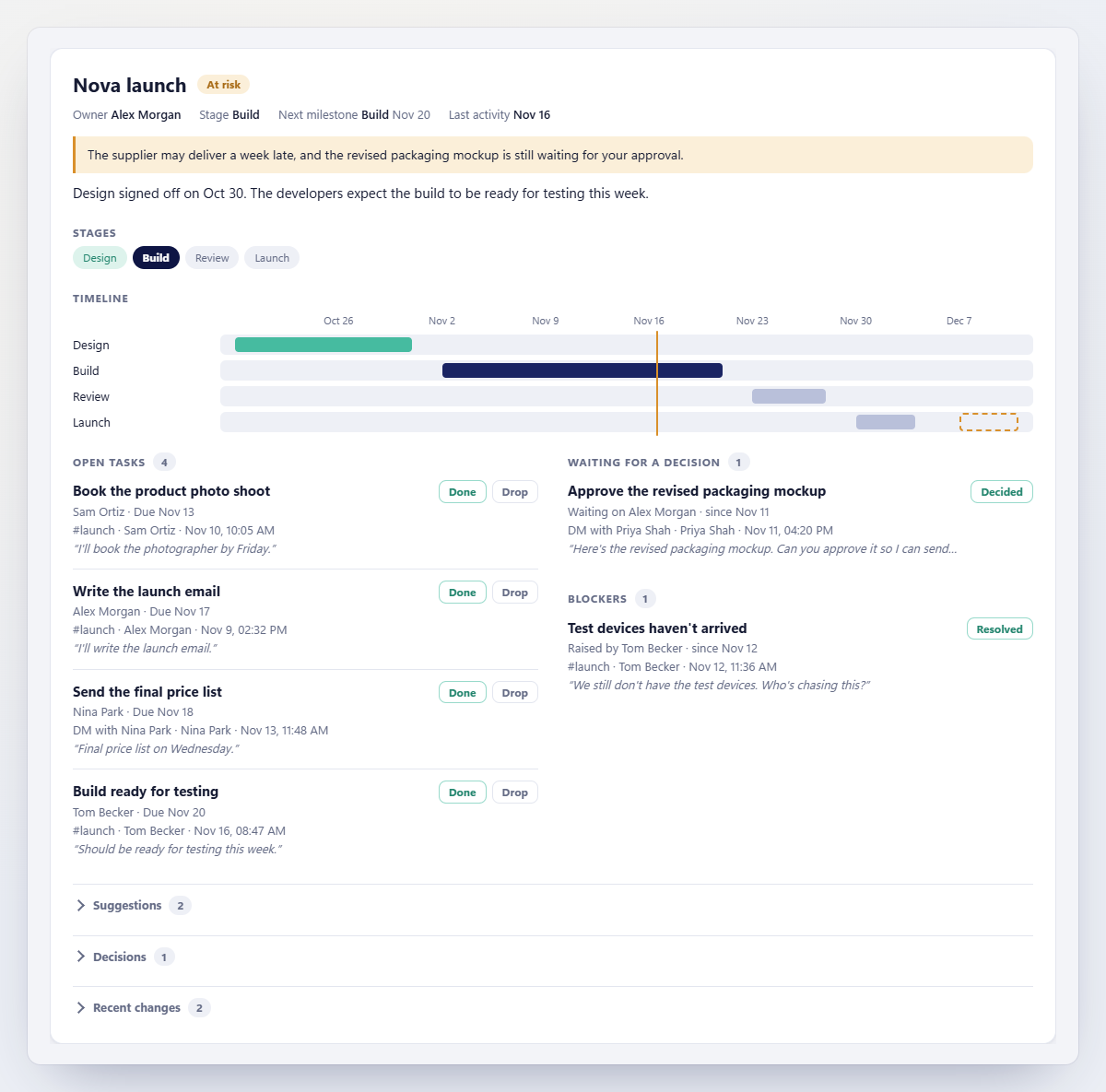
- The supplier's delay is a dashed line on the Gantt chart. It's a proposal: your schedule doesn't move until you accept it.
- Below that are the current stage, open tasks, pending decisions and a few suggested next steps. Every item links back to its message.
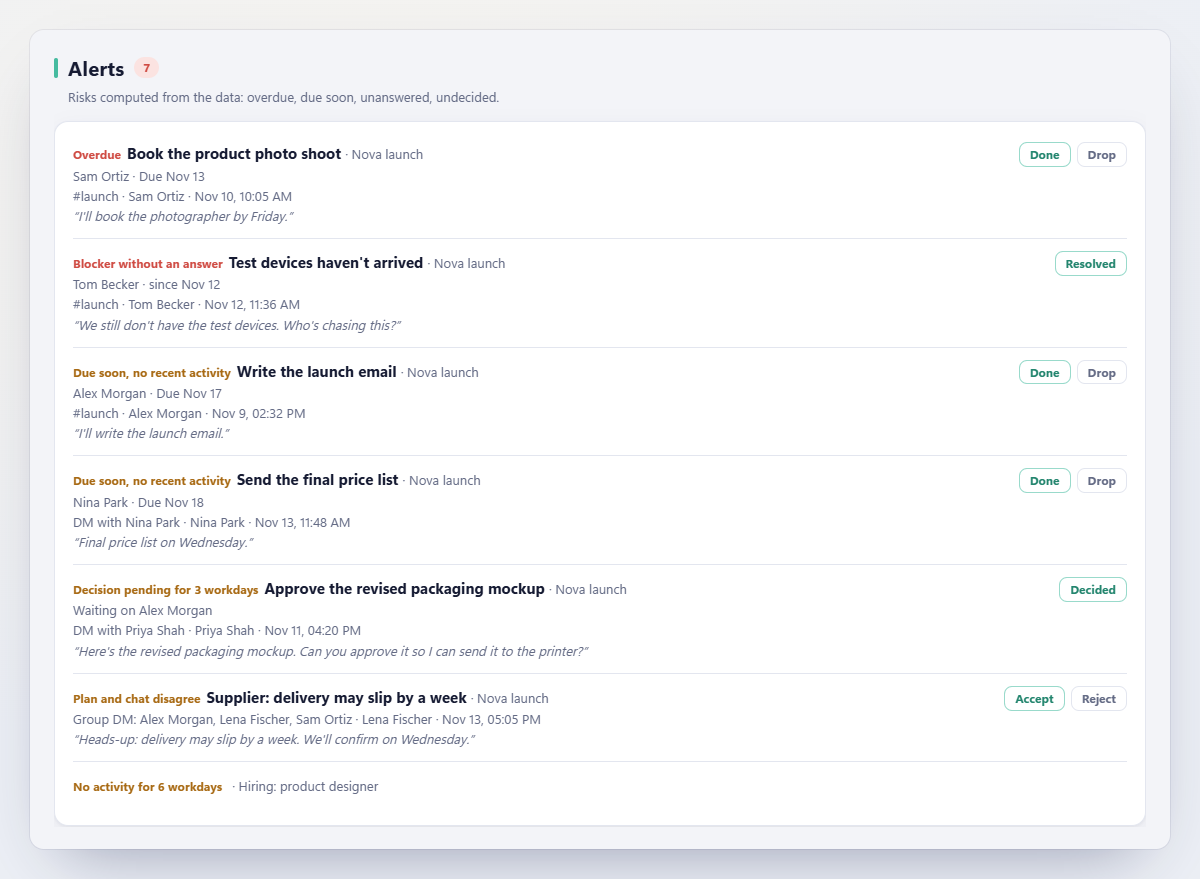
The report also watches for the things that slip through: overdue tasks or milestones; tasks due within two days that nobody has mentioned lately; projects with no activity for five working days; blockers with no answer after a working day; and decisions still open after three working days.
If you'd rather not open the page, ask the agent: "What's holding up the launch?" or "Which decisions are waiting on me?" It answers from the project files and tells you which messages it's going on.
it will get some things wrong
Chat is vague. "I'll take a look" might be a promise or just politeness, and an idea isn't always a decision. The agent won't read every one correctly.
That's why every item in the report carries its source, so you can check it. If something's wrong, fix it on the page: mark it done, drop it or reopen it. Then choose Copy for your agent and paste it into your chat with the agent. It applies your corrections before anything else.
One more thing: the report is yours, not a board for scoring your team. The agent only reads conversations your account can already see, and the backup and report stay on your computer. The messages it reads are processed by the AI provider you use, though. I'd let the team know, and check what your company's policy says about sending work conversations to AI.
how to start
You need three things: Empowia for Slack (Windows, or a Mac with Apple silicon), Claude Code or Codex, and the free Project Pulse skill. Claude Code needs a paid Claude plan; whether you can use Codex depends on your OpenAI plan. The README covers installation and setup.
You can ask the agent to update the report whenever you like, or schedule it in the Claude desktop app or Codex. For scheduled runs, your computer has to be awake, the agent app open and Empowia running.
Start with the project that worries you most. If the report ever flags a blocker before a meeting, add a second one.
If your bigger headache is your own deadlines across several projects, read How I Keep Every Project on Track Using Only My Slack Chats. If it's just scattered small requests that don't add up to a project, see How I Track the Small Team Tasks Buried in Slack.
FAQ
Can you use Slack for project management?
Yes. Teams plan in channels, work in threads and track tasks with Slack Lists. The hard part is that decisions and date changes often happen in DMs, so the project overview rarely stays current. Empowia Project Pulse lets your AI agent read those conversations and update a local report for you.
How do you track project progress in Slack?
For a list the whole team shares, use Slack Lists or connect a project management tool. For an overview that comes straight from the conversations, back up your Slack with Empowia for Slack, connect Claude Code or Codex, and install the free Project Pulse skill. The agent suggests projects, agrees milestones with you and updates the report from new messages.
Can I make a Gantt chart from Slack conversations?
Yes. You and the agent agree on stages and milestone dates, and the report draws the Gantt chart. When someone mentions a new date in Slack, it appears as a proposal first and only counts once you accept it.
Can it track private channels and DMs?
Yes, as long as your own account can see them and they're in your Empowia backup: private channels, DMs and group chats. It can't see other people's private conversations and has no Slack admin access.
Does it replace Jira, Asana or Slack Lists?
No. Those tools are for task lists the whole team shares. Project Pulse gives you a personal overview of the projects discussed in Slack, including the decisions and blockers that never make it into a task list.
Can project tracking update automatically?
Yes. A scheduled task in the Claude desktop app or an automation in Codex can run Project Pulse on a schedule. Your computer has to be awake, the agent app open and Empowia running, so the backup is current.
Does it work with a free Slack plan?
Yes, but Empowia can't back up messages older than 90 days that Slack's free plan has already hidden.
Comments
Loading comments…