How I Keep Every Project on Track Using Only My Slack Chats
When your commitments and deadlines are scattered across Slack, a master list falls behind. I let an AI agent keep track, so each morning I can see what to do first.
The Empowia Team

Quick answer
To manage multiple projects, each one needs to answer four questions at any time: what's the next milestone, what do I owe, what am I waiting on and what's my next step. The hard part is that the answers keep changing, and in Slack they're scattered everywhere. Back up your messages with Empowia for Slack and add the free Project Pulse skill to Claude Code or Codex. The agent updates each project's plan from your conversations and pulls them into one local report.
You've got three things on at once: a product launch, a client delivery and a monthly report.
On Tuesday, a colleague writes in a DM: "I'll send you the figures tomorrow." On Wednesday, the client changes the review date in a thread. On Thursday, you say in a channel that you'll look over someone's draft.
By Friday, your to-do list shows what you planned to do, not what people are waiting for you to do.
why a master list falls behind
You've probably heard the usual advice: prioritize, block time, keep a master list, review it every week. All true. But once your projects move through Slack, the list starts going stale as soon as you've updated it. Each of those three messages is something you have to remember and copy over yourself. Miss one, and the list is wrong.
What I realized is that I didn't need more lists or a fancier board. I needed each project to answer four questions at any moment:
- What's the next milestone? How many days away?
- What do I owe? Who's waiting on me?
- What am I waiting on? Who needs a nudge?
- What's my next step? The one thing I can do today.
If I can answer those in the morning, the day sorts itself out. Do what's holding other people up first, check the nearest milestone, then chase what you're owed before it turns into tomorrow's emergency.
If all you need is a record of one-off promises, a personal to-do list from Slack may be enough. I mean projects that run for weeks, with stages and dates that keep moving. With those, the hard part is keeping the four answers current.
so I handed it to an agent
That's the job I gave my AI agent. Empowia for Slack backs up my Slack messages to my computer. Empowia Project Pulse is the free, open-source skill I wrote for this, and it works in both Claude Code and Codex. The agent reads the backup and keeps each project's plan, and one report, up to date.
The first time, all I said was "find my projects". It went through my recent conversations, listed a few candidates and showed the messages behind each one. I decided which were real projects and which to ignore.
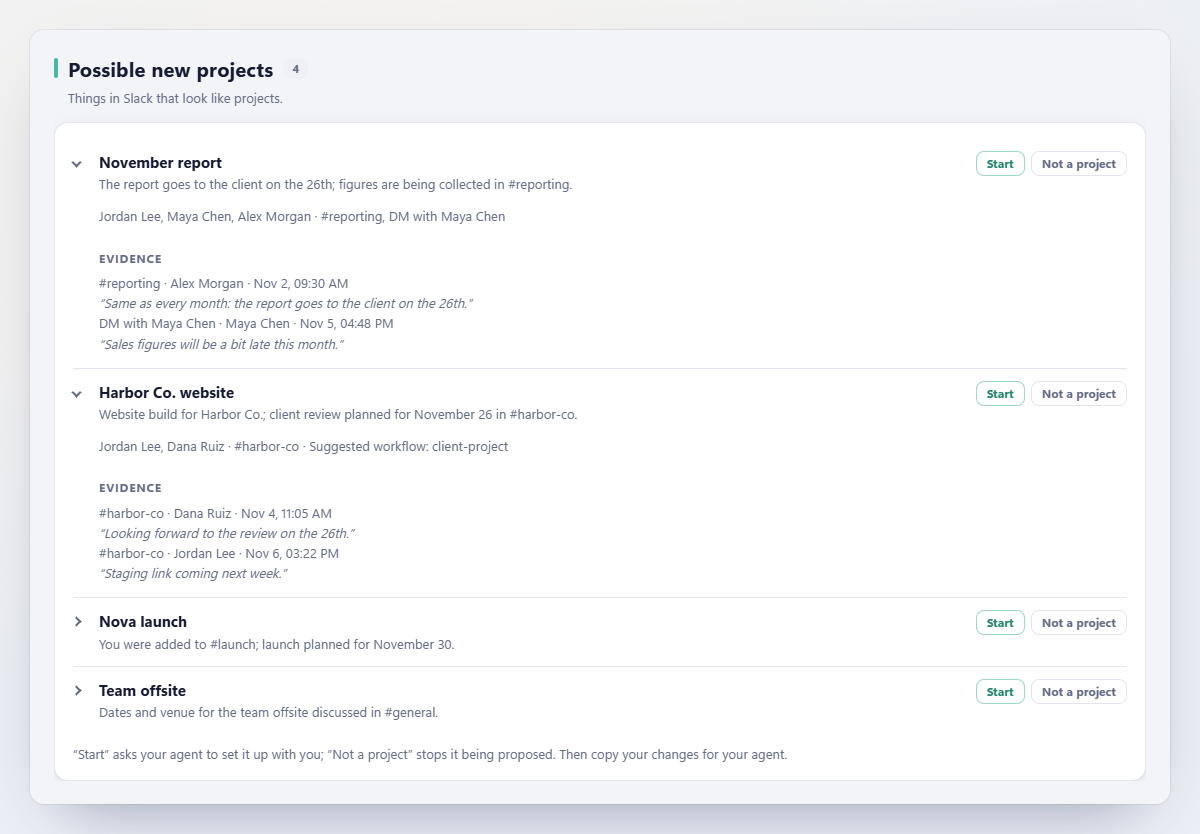
I'd pick two or three to start. The point isn't to turn every conversation into a project.
a plan for each project, in a short chat
Once you've picked, the agent works out stages and milestones with you. You don't draw the Gantt chart yourself: it proposes one, and you adjust the dates and stages until they match the work.
Take the monthly report. The stages could be collect figures → review → send. You agree that "the figures are in" ends the first stage and "sent to the client" ends the last. From then on, the agent watches new Slack messages for those signals.
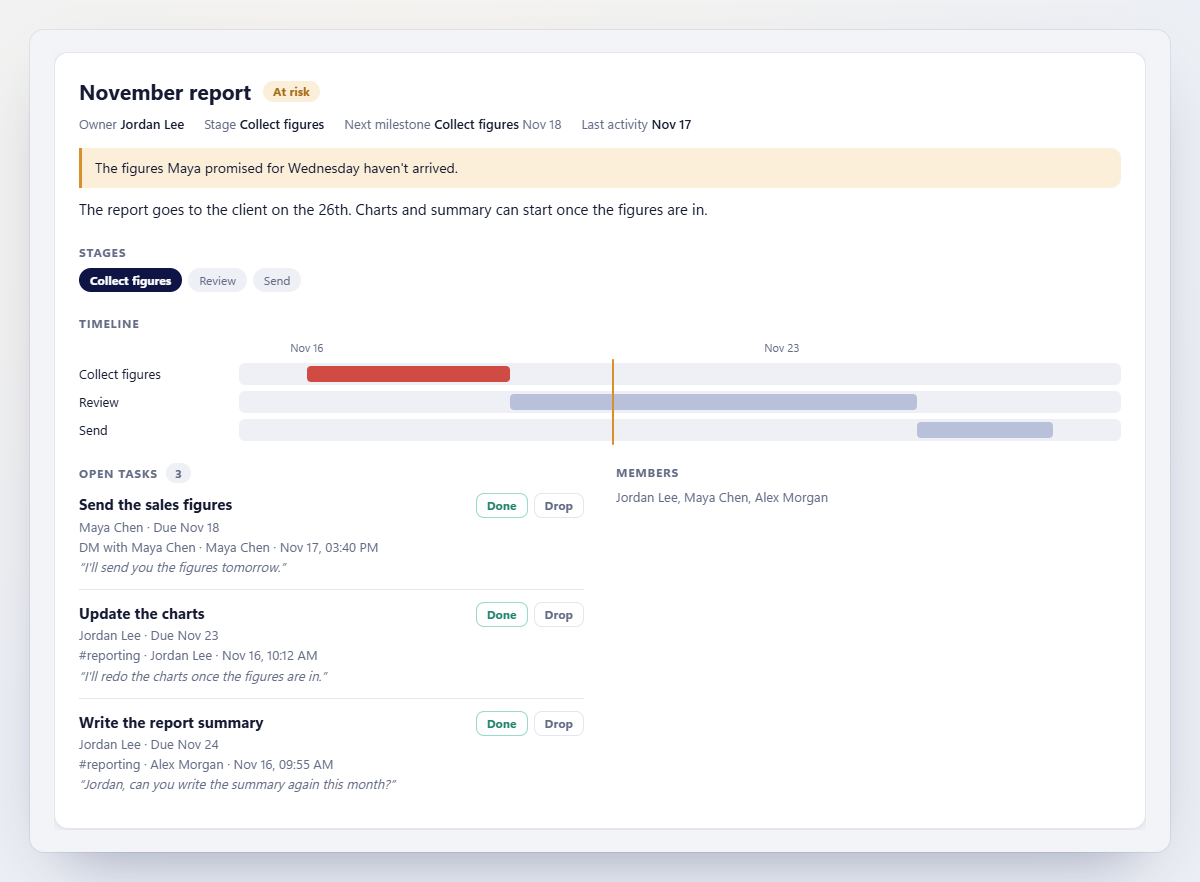
Next month's report can reuse the same workflow.
the next Friday
Once the projects are set up, the next Friday you don't dig through DMs and threads. You open the report:
- The draft you promised to look over is under Waiting on you.
- The figures your colleague promised are under Owed to you. If the day passes and they haven't arrived, you know who to chase.
- The client's new review date is under Plan changes seen in chat. Whether to move your schedule is up to you.
- Below that are the alerts: overdue work, deadlines coming up that nobody has mentioned, or a project that has gone quiet.
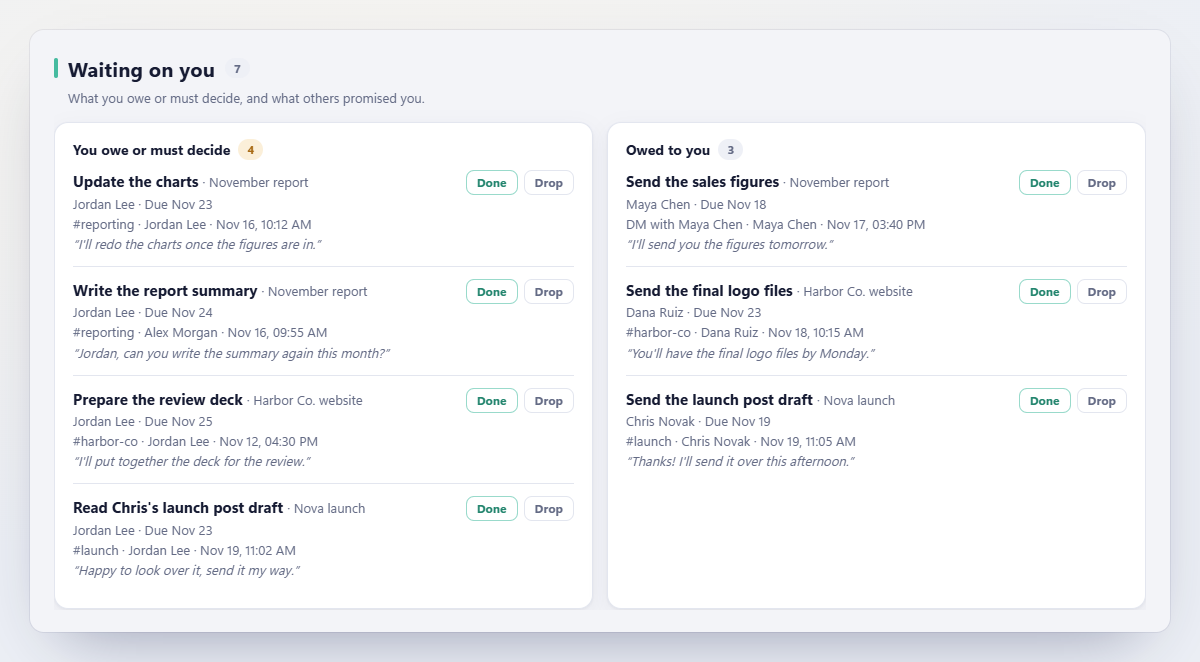
This is how I read it each morning. Waiting on you first, so nobody is stuck because of me. Then the nearest milestones. Then I chase the one dependency most likely to slow my day. Only after that do I pick one thing I can actually finish today.
You don't need the report for every question. Ask the agent "What do I owe this week?" or "What's at risk in the client project?" and it answers with links to the source messages.
You can update the report by hand any time, or schedule it on weekdays in the Claude desktop app or Codex. For scheduled runs, your computer has to be awake, the agent app open and Empowia running, so the backup is current.
when it gets something wrong
"I'll check" might be a promise, or it might just mean you'll think about it. The agent won't always guess right.
So every item comes with the Slack message behind it, and you can check. If it's wrong, mark it done, drop it or reopen it in the report, then choose Copy for your agent and paste that into your chat with the agent. It applies those changes first.
None of this needs your teammates to switch tools, and you don't need a Slack admin. The backup and report stay on your computer, and the agent only reads conversations your account can see. The messages it reads do go to the AI provider you use, though, so if the conversations are sensitive, check your company's policy first.
start with the project you keep checking
You need three things: Empowia for Slack (Windows, or a Mac with Apple silicon), Claude Code or Codex, and the free Project Pulse skill. Claude Code needs a paid Claude plan; whether you can use Codex depends on your OpenAI plan. The README has the installation steps.
Pick the project you keep going back to Slack to check. Set it up, see whether the report catches what you'd normally chase, and correct what it misses. Once that works, add the next one.
If you lead a team and want to see project health, blockers and decisions across its work, there's a separate guide: How I Turn Slack Chat History Into a Self-Updating Project Tracker.
FAQ
How do I manage multiple projects at once?
Keep a short plan for each project: the next milestone, what you owe, what you're waiting on and your next step. Look at all the plans together each day. Deal first with whatever is holding someone up or due soon, then chase what you're waiting on. If the projects move through Slack, an AI agent using Empowia Project Pulse can keep the plans current for you.
How can I track progress across multiple projects in Slack?
Back up your Slack messages with Empowia for Slack, connect its read-only MCP server to Claude Code or Codex, and install the free Project Pulse skill. The agent agrees milestones with you, follows progress from new messages and pulls your chosen projects into one local HTML report.
How do I keep track of what I've promised people in Slack?
For one-off promises, a personal to-do list is enough. For projects that run for weeks, group your commitments by project and milestone. Empowia Project Pulse lists what you owe and what you're owed, each linked to its Slack message.
Do my teammates need to install anything?
No. Empowia backs up your Slack using the session you're already signed into, and the skill and report run on your computer. Your teammates use Slack as usual, and no Slack admin is needed.
Can I put personal project deadlines in a Gantt chart?
Yes. Project Pulse agrees stages and milestone dates with you and draws them as a Gantt chart. When someone mentions a different date in Slack, it shows up as a proposal instead of changing your plan.
Does it work with a free Slack plan?
Yes, but Empowia can't back up messages older than 90 days that Slack's free plan has already hidden.
Comments
Loading comments…