Set Up Custom AI Extraction for Slack — Pull Exactly the Data You Need
Go beyond the built-in Insights and tell Empowia's AI exactly what to pull out of your Slack. Describe what to gather in your own words, scope it to the right channels, and run it on a schedule so your structured data stays fresh on its own.
The Empowia Team

Empowia's built-in Insights — To-dos, Decisions, and Links — are the fast on-ramp. They round up the three things almost every team wants out of Slack, and they work the moment you point them at a channel. If you haven't tried them yet, start with turn Slack into a to-do list and capture decisions & links.
But those three are just the beginning. The real power in Empowia for Slack is that you can tell the AI, in your own words, exactly what to pull out of your conversations. Feature requests. Bug reports. Competitor mentions. Sales objections. Anything that keeps surfacing in your Slack but nobody has time to catalog by hand.
That's what "custom AI extraction for Slack" really means: not a fixed menu of reports, but a way to mine structured data from Slack on your own terms.
Ideas worth stealing
The easiest way to get the idea is to picture a few. None of these are canned features — they're just prompts you'd write. Here are four a team could stand up this afternoon.
1. Feature requests from #feedback. Aim it at your #feedback channel and spell out what you're after: "Find every message where someone asks for a new feature or capability. For each one, capture the requested feature, who asked, and how urgent it sounds." Now the wishlist that used to sit scattered across hundreds of messages becomes a clean, reviewable list.
2. Bug reports from #support. In a busy #support channel, real bugs hide between questions and chatter. Scope a run there — "Pull out messages that describe something broken or not working as expected; note the affected area and any error text" — and a noisy channel turns into a triage queue you can actually work through.
3. Competitor mentions across the workspace. Sales and product both drop competitor names into conversation constantly. Ask the AI to "Find any mention of a competing product or company, and capture what was said about them," and you get a running pulse on how the market shows up in your own team's words — without anyone tagging a thing.
4. Sales objections from #deals. For a revenue team, the patterns in why deals stall are gold. "Surface moments where a prospect raised a concern, hesitation, or reason not to buy; capture the objection and the deal it relates to." Over a few weeks, you're looking at a self-assembling objection library straight from the front lines.
Notice the shape of each one: a plain-language description of what to look for and what to capture. That's the whole interface. You're not writing rules or regexes — you're briefing an assistant.
How to set one up
The flow is deliberately short. Assuming you've already backed up the relevant channels, here's the path from idea to structured list.
Open Insights. In Empowia for Slack, head to the Insights area where To-dos, Decisions, and Links live. This is your home base for both the defaults and anything you create.
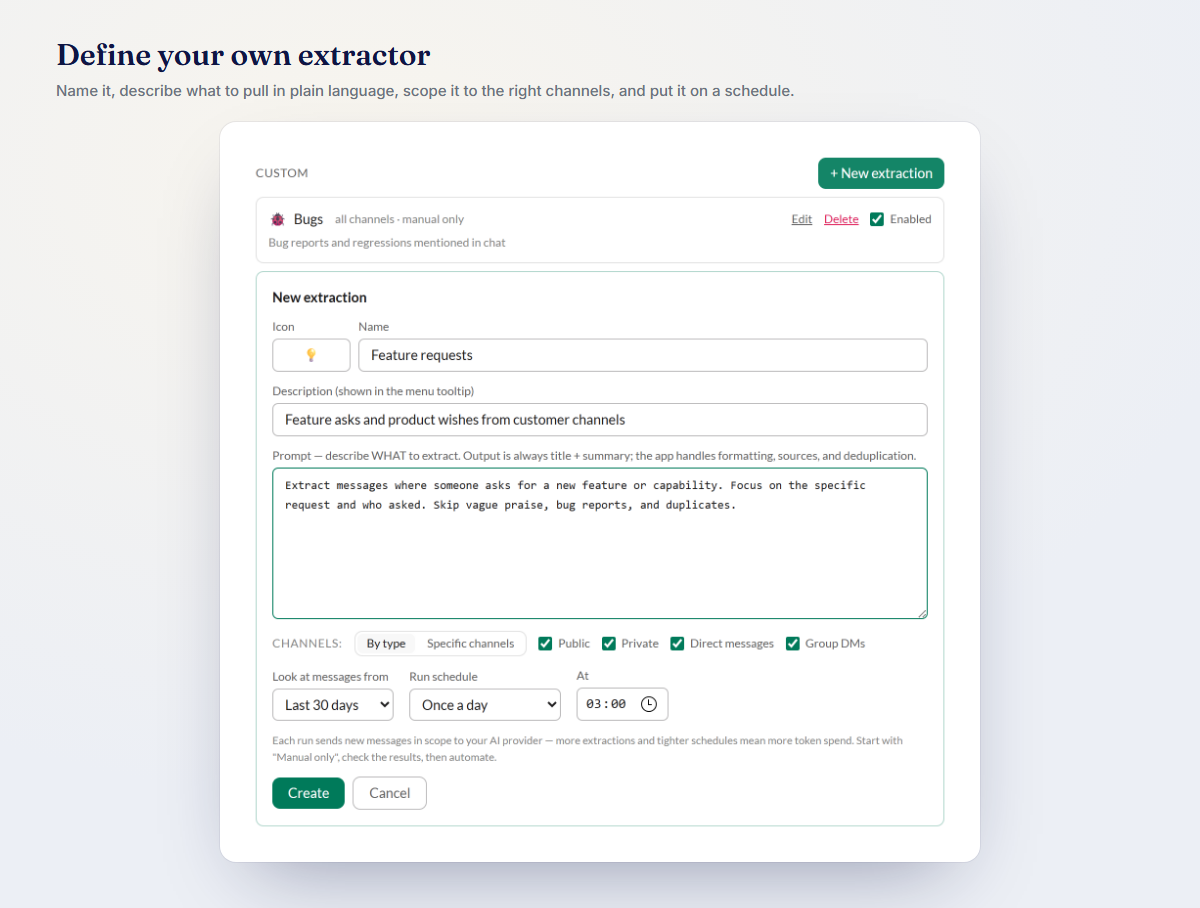
Start a custom extraction. Choose to define your own instead of running a built-in. You'll get a space to describe it.
Say what to pull out — in your own words. Write it the way you'd brief a smart new teammate. Say what qualifies, and say which fields you want back. To collect bugs: "Find messages reporting something broken. For each, capture a short summary, the affected feature, and any error message quoted." Specific beats clever — the clearer your description, the cleaner the results.
Scope it to the right channels. Point it at the channels where that content actually lives —
#supportfor bugs,#feedbackfor requests. Narrowing it keeps results sharp and keeps each run cheap, since the AI only reads what's relevant.Run it. Empowia's AI sifts the scoped messages and hands back a structured list of items that match your description.
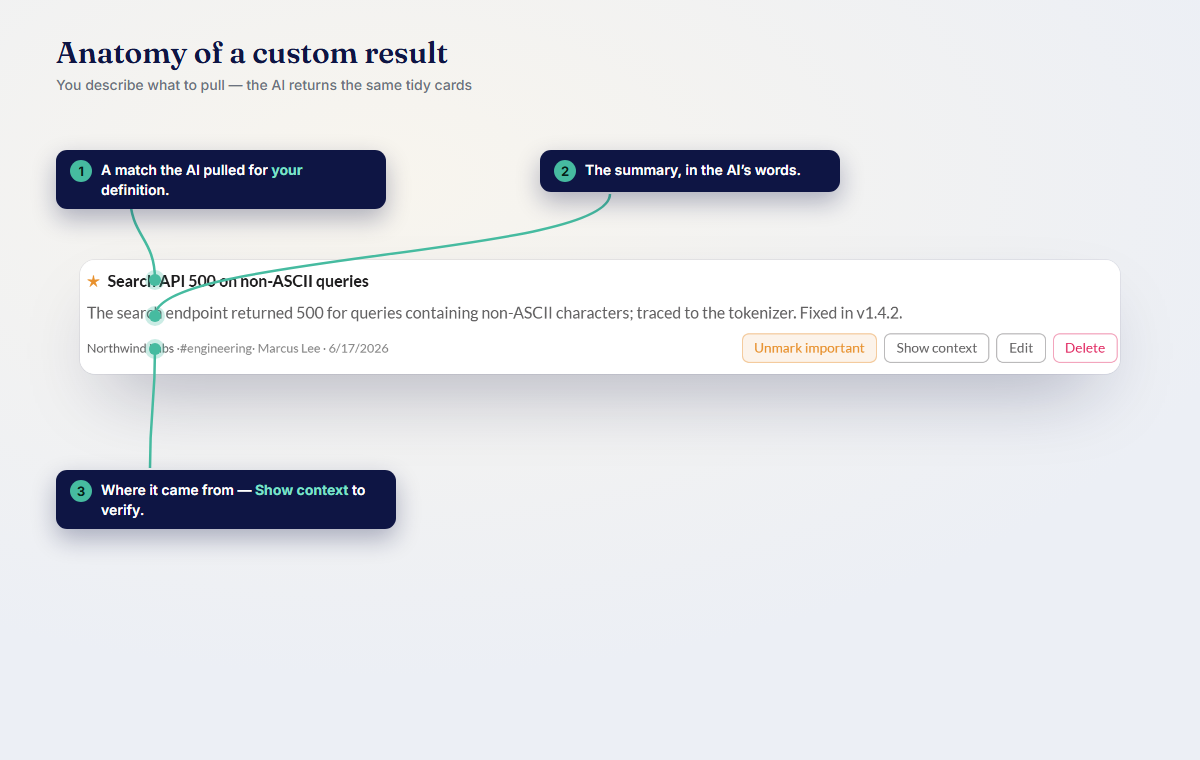
Review results with source links. Every item links straight back to the original Slack message. So when a bug report looks important, you're one click from the full thread — context, reactions, and all. Nothing is a black box; you can always check the AI's work against the source.
That's it. If the results come back too broad or too narrow, tweak the description and run it again. Custom extraction rewards iteration, and iterating costs you a few seconds.
Put it on autopilot
Running it once is useful. A standing one is transformative. Any custom extraction can run on a schedule, so the results stay current without you lifting a finger.
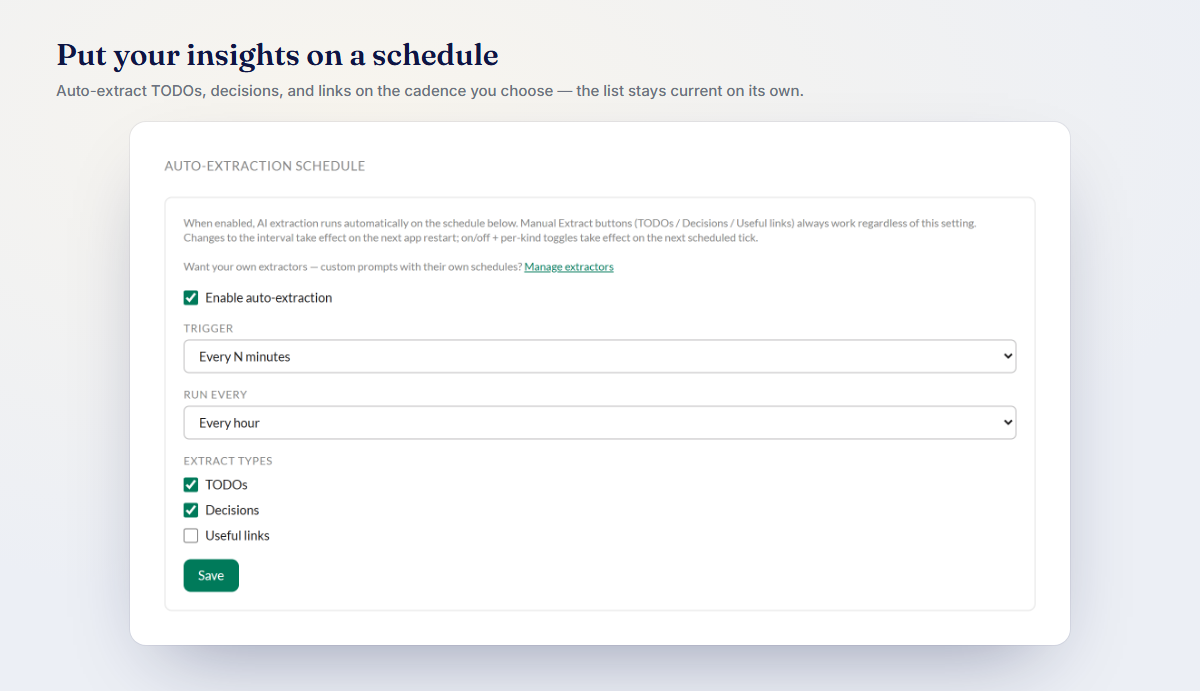
Set your feature-request run to refresh regularly and it quietly becomes a living wishlist. Schedule the bug one and you've got a triage board that repopulates on its own. Schedule the competitor sweep and you've built a lightweight market monitor out of your own Slack.
The mental shift is the point: instead of asking your Slack a question once, you're standing up a set of always-fresh views that answer the same questions on repeat. Structured data from Slack, kept warm — that's Slack AI automation without any glue code, webhooks, or third-party pipeline.
Why local + BYOK matters here
Pulling data like this means handing an AI your rawest internal signal — unfiltered customer complaints, deal risks, competitive intel. Where that runs matters a lot.
With Empowia, it runs in the right place: on your machine. Empowia for Slack is 100% local. Your backup, your files, and your signed-in session never leave your own computer. There's no Empowia cloud, no account, and no telemetry — so your data and your prompts never pass through a server we control.
The AI piece is Bring-Your-Own-Key. You plug in your own Gemini, Claude, or OpenAI key, and calls go directly from your machine to the model you chose. That means:
- You control the model. Pick the provider and model you trust for the job.
- You control the cost. Empowia shows the cost per answer, so there's no mystery bill. And on Gemini's free tier, running your searches can cost nothing at all.
- You control the data path. Only the messages a run needs are sent, only to the model you picked, only when you run it.
For sensitive internal signal, "local plus your own key" isn't a nice-to-have — it's the whole reason you can point AI at this data with a clear conscience.
Start building your own
The built-in Insights get you moving in minutes. Custom extraction is where Empowia starts to fit your team's shape — the exact things you wish someone were tracking in Slack, now flagged automatically and always fresh.
Download it free and you get the full app, capped at 20 conversations, so you can try a custom run before spending a cent. When you're ready for your whole workspace, unlocking unlimited is a one-time purchase, with your offline code delivered by email. And once your structured data is flowing, you can even use it in Claude & Cursor with MCP to keep going.
Prefer Mac or Linux? You can get notified the moment your platform is ready on the download page.
FAQ
What is custom AI extraction in Empowia?
It's a search you define yourself in plain language. Instead of leaning on the built-in To-dos, Decisions, or Links, you describe what you want pulled out of your Slack — like feature requests or bug reports — scope it to specific channels, and Empowia's AI hands back structured items that link straight to the source message.
Does my Slack data leave my computer when I run a custom extraction?
No. Empowia for Slack is 100% local. Your backup, files, and sign-in session stay on your own machine, and AI runs on your own API key (Bring-Your-Own-Key). Your data and prompts never pass through an Empowia server.
Can I keep the results up to date automatically?
Yes. You can run any custom extraction on a schedule so the results refresh on their own, giving you an always-current view of feature requests, bugs, competitor mentions, or whatever you defined.
Comments
Loading comments…