Find the Files and Links You Lost in Slack
That PDF, design link or spreadsheet is somewhere in Slack. Here's how a personal archive helps you find saved files, shared links and the messages behind them.
The Empowia Team
Quick answer
To find files and links shared in Slack later, keep a local archive of the conversations and files you can still access. Empowia for Slack includes a files gallery and full-text search, so you can look for the saved resource without remembering which conversation it came from. Its AI extraction can also collect useful shared links. Back up early: an archive cannot retrieve Slack Free history that was already hidden before you started.
Key takeaways
- A personal Slack archive is most useful when it helps you retrieve a document, link or original conversation, not merely store more data.
- Empowia keeps backed-up Slack files locally and provides a files gallery and full-text search.
- Shared URLs and uploaded attachments are different: a saved link is not a saved copy of the document behind it.
- Link extraction uses AI, sending relevant message context to the provider you select; the backup and local search stay on your computer.
- On Slack Free, start before older messages and files disappear from view; already hidden content cannot be added retroactively with Empowia.
Someone sends me a PDF, I open it, and I move on. Three weeks later I need the PDF again. Was it in a DM? The project channel? Did someone post a new version after I saw it? Now I'm searching for a filename I don't quite remember, which is about as useful as searching for a person by the color of their coat.
That is the part of Slack I wanted to fix. I don't need another dashboard telling me how many messages I saved. I need to find the spreadsheet, the design link and the conversation that explains which one was final. A personal Slack archive becomes valuable the first time it gives me that answer without asking anyone to resend a file.
the Slack file you know someone sent
Picture three ordinary moments. A client sends a signed PDF in a DM. A designer shares a Figma URL in #launch. Someone drops a revised budget spreadsheet into the thread where the team approved it. These feel like small exchanges at the time. Later, they become important because the context matters as much as the filename.
Slack organizes work around conversations. That's great while everyone is talking, less great when your only clue is “someone sent me a version of this.” Searching a channel works if you remember the channel. Searching a filename works if you remember the name. Sometimes I remember neither.
I want a different starting point: the resource itself. Not “which channel was that in?” but “show me the files I saved.” Not “what did we call the website?” but “where's the link we shared?” That change in the question is what separates this article from a general backup guide.
a personal Slack archive starts with the files
With Empowia for Slack, I can keep an archive of the conversations and files my Slack account can access, stored on my computer. The app has a files gallery, which gives me a place to work from when I need an attachment rather than a conversation. That is much more useful than having a folder full of mystery filenames and hoping I recognize one.
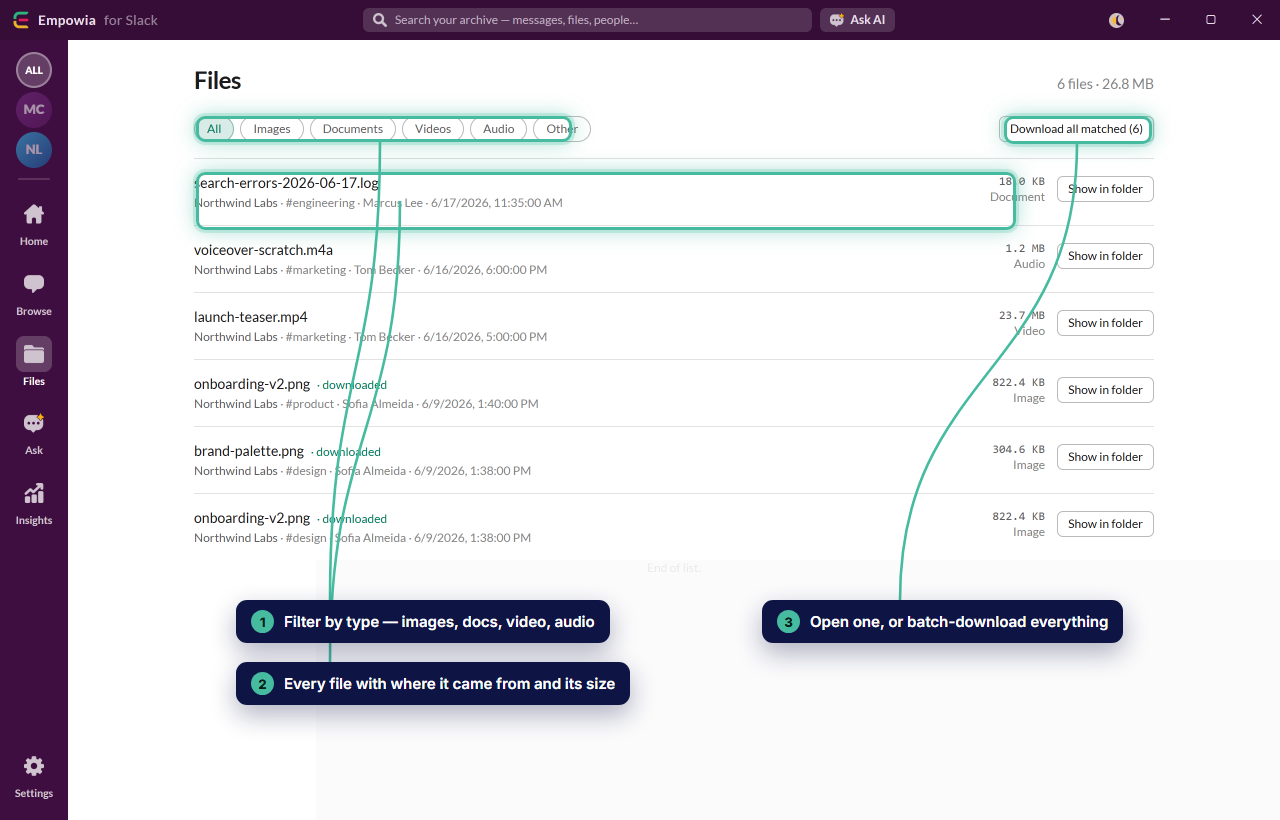
Let's say I need the signed version of a proposal. I start with the files I saved, open the likely candidate, and then check the conversation around the time it was shared. Was this a draft, or the attachment someone replied “approved” to? A resource without its message is half a memory.
I don't want to promise that every file anyone ever posted is there. The archive can contain the content available when I backed it up. Slack Free hides older messages and files after 90 days; Empowia cannot fetch content that was already hidden before I started. That is why the useful habit is to start keeping a copy while the files are still in view.
The files gallery isn't a replacement for the original message. It's the shortcut that gets me close enough to ask the right next question.
shared links are a different kind of treasure
Not everything important in Slack is an uploaded file. A colleague posts a Notion document, a Figma frame, a Drive spreadsheet or a ticket. Those are links: Slack has the URL, not necessarily the underlying document. Saving a message that contains a Drive link does not create a backup of the Drive file.
That distinction keeps the promise honest. A personal archive can preserve the link someone shared, along with the conversation around it. It cannot promise that the external service will always keep the document online or continue granting access.
Empowia also has an AI extraction for links, which can gather useful links shared across the messages in your archive. It's a good fit for the moments when I remember “there was a dashboard somewhere in last month's messages” but not its title. I would treat the result as a way to find and revisit those URLs, not as a copy of every page they point to.
Because this is AI extraction, the relevant messages go to the AI provider you choose, using your own key. The Slack backup and local full-text search remain on your computer. If you only need the message containing a known URL or phrase, local search is the simpler starting point.
find the conversation behind the file
A file with a name like proposal-final-3.pdf may not be final at all. I have learned not to trust filenames when a two-line Slack reply can settle the question.
Suppose I locate the attachment but want to know whether anyone approved it. The next move is to search the saved messages for the filename, project name or phrase that appeared around it. Empowia's local full-text search lets me look through backed-up conversations without depending on the current Slack history window.
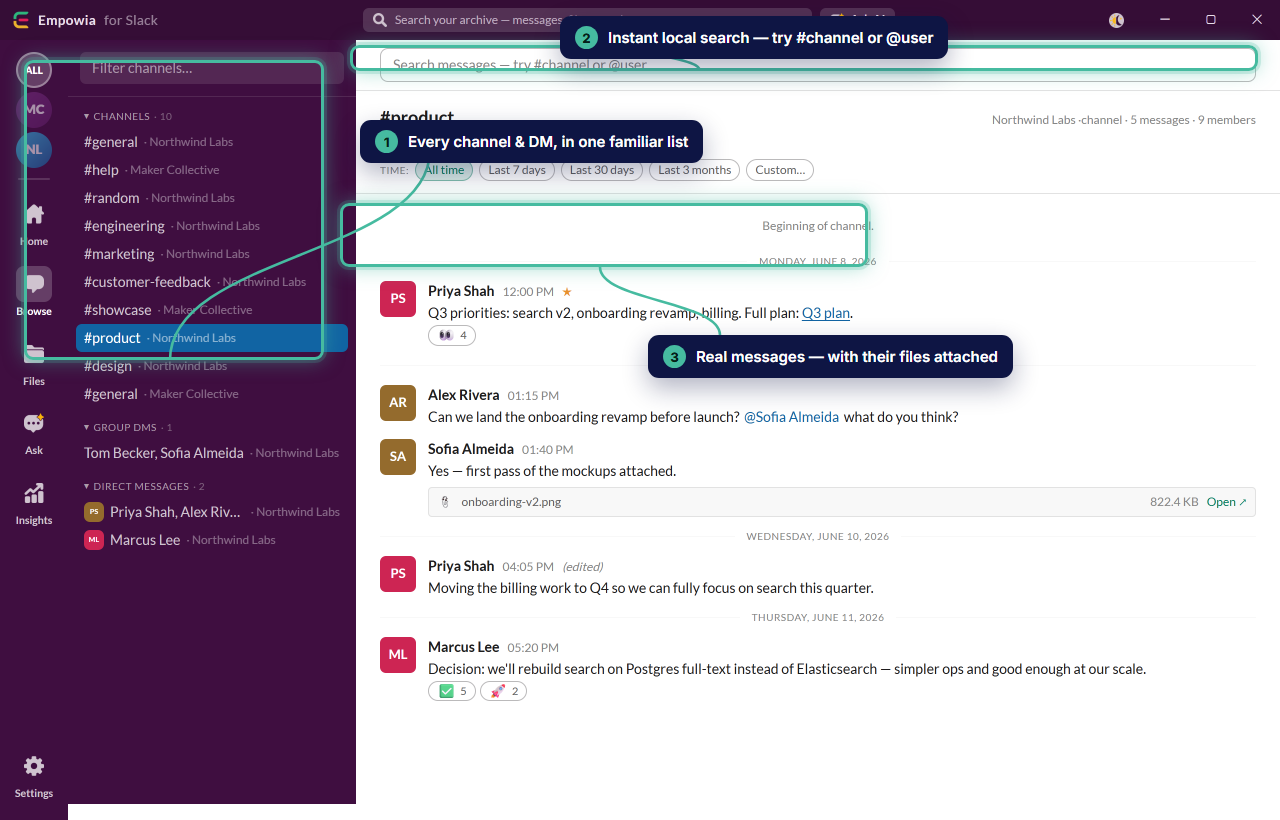
What I'm after is the chain: here's the file, here's who shared it, here's the message that says what it is, and here's the reply that explains whether to use it. Even when the file exists in two versions, those little pieces of context can save a lot of wrong turns.
Sometimes the exact words aren't coming back. That's when I might use Ask, the cited AI question feature, to ask about a decision or a document from the archived conversations. I still follow its references to the original messages; a confident answer isn't better than its evidence.
Most days, a gallery plus ordinary text search is enough. I like that the simple route stays simple.
what the archive keeps — and what it can't
A local archive does two useful things. It keeps backed-up messages and files on your own computer, and it makes that saved history searchable later. But “local” does not mean “a complete record of every message that ever existed.”
It won't pull private conversations your account never had access to. It won't recover Slack Free messages or files that were already hidden before you began. It won't download a document from an unrelated service merely because someone pasted its URL into Slack. And it doesn't restore messages into a live Slack workspace. Those are different capabilities, not missing labels on one product.
There's also a difference between this personal archive and the company-wide backup an IT department might need. If you're responsible for restoring a workspace after an incident, read about personal archives versus enterprise Slack recovery before deciding what to buy.
If your concern is privacy rather than retrieval, I've explained where local Slack backup data lives and what AI sends out separately. Here, the goal is the everyday one: finding something you already saved.
the two-minute retrieval test I actually use
I don't measure a personal archive by how impressive the feature list looks. I give it one task I would normally find annoying.
First, I choose an attachment I know was shared recently and that I am allowed to retain. A PDF or an image is enough. I check that the actual saved file opens on my computer, not just a web link back to Slack. That's my proof that the resource survived the backup.
Next, I pick a phrase from the surrounding conversation. Maybe it's “please use this version.” I search for it in the local archive and check whether I can identify the right discussion. Finally, I find a useful link that somebody shared and note whether it still opens at its destination. A saved URL is valuable, but it's not immunity against a document being moved elsewhere.
If any of those checks fails, I investigate now, not six months later when someone needs the contract. For the separate process of downloading actual file bytes instead of keeping file links, see how to back up Slack attachments.
make your Slack history useful, not just stored
A backup you never open is insurance. An archive you can search is also a working tool. I wanted the second kind: the version of Slack history where an attachment doesn't vanish into whichever channel happened to be busy that Tuesday, and a link doesn't depend on remembering who pasted it.
This isn't a promise that all your old Slack data is waiting to be rescued. It's a reason to save what you still have and make it findable. The free version of Empowia for Slack includes its features for up to 20 conversations, so you can start with the channels and DMs that matter before deciding if you need more.
The next time someone says “I sent you that file in Slack,” I'd much rather find it myself than send the awkward “could you share it again?” message. That's the small, practical win a personal archive should deliver.
FAQ
How can I find a file someone shared in Slack?
Back up the conversations and files you can still access, then use the files gallery and local full-text search in Empowia for Slack. Check the surrounding conversation when you need to know which version was shared.
Can a Slack archive collect links as well as attachments?
Empowia has AI extraction for useful links shared in messages. The link itself is a URL, not a downloaded copy of the external document it opens.
Are my archived Slack files stored in the cloud?
Empowia stores the backup and files on your computer. If you use Ask or AI extraction, relevant message context is sent to the AI provider you choose using your own key.
Can I archive old Slack Free files I can no longer see?
Not with Empowia. It backs up history you can currently access and cannot retrieve messages or files the Free plan had already hidden before you started.
Comments
Loading comments…