Empowia vs. offizieller Slack-Export: Was ist die beste Wahl?
Ein direkter Vergleich zwischen dem integrierten Slack-Export und Empowia for Slack – Einrichtung, Funktionsumfang und der Export deines Verlaufs als JSON, CSV oder Excel (ganz oder teilweise).
The Empowia Team
Beide Optionen helfen Ihnen dabei, Ihren Slack-Verlauf aus Slack zu exportieren. Sie wurden jedoch für völlig unterschiedliche Zielgruppen entwickelt – und gehen das Thema „Export“ auf fast gegensätzliche Weise an.
Einrichtung
- Offizieller Export: Nur für Admins verfügbar, und im kostenlosen Tarif sind nur öffentliche Kanäle enthalten. Das Ergebnis ist ein Ordner voller roher JSON-Dateien, die Sie erst mühsam aufbereiten müssen.
- Empowia: Ein Klick, kein Admin-Status nötig, keine Token. Es nutzt einfach die Sitzung, in der Sie bereits angemeldet sind.
Funktionsumfang und Abdeckung
- Offizieller Export (kostenloser Tarif): Nur öffentliche Kanäle.
- Empowia: Öffentliche und private Kanäle, Direktnachrichten (DMs) und Gruppen-DMs – alles, was Sie auch in Slack sehen können.
Exportieren: Ein einziger Datenberg vs. echte Auswahl
Hier zeigen sich die größten Unterschiede. Slacks offizieller Export ist das gesamte Produkt: ein einziger Alles-oder-nichts-Export des gesamten Workspace in einem einzigen Format, exklusiv für Admins. Empowia hingegen betrachtet den Export als eine von vielen Funktionen für ein Archiv, das Ihnen bereits gehört – Sie haben also die freie Wahl:
- Wählen Sie aus, was Sie exportieren. Den gesamten Verlauf oder nur bestimmte Unterhaltungen – einen einzelnen
#Kanal, eine DM oder eine Auswahl davon. Sie müssen nie den gesamten Workspace herunterladen, nur um an einen bestimmten Thread zu gelangen. - Wählen Sie das Format. JSON, wenn Sie die Daten in ein anderes Tool einspielen möchten, oder CSV und Excel, um sie in einer Tabellenkalkulation zu öffnen – zum Filtern, für Diagramme, Pivot-Tabellen oder um sie an Kollegen weiterzugeben, die noch nie eine JSON-Datei geöffnet haben.
- Mit einem einfachen Klick. Unterhaltungen auswählen, Format bestimmen, fertig. Keine Admin-Konsole, keine Skripte, keine OAuth-App.
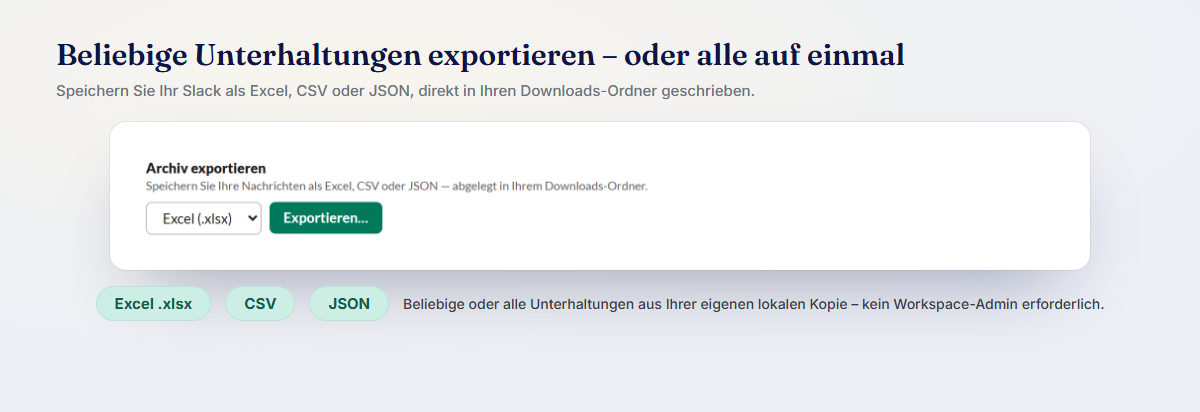
Ein Vorhaben wie „Exportiere meinen #produkt-Kanal nach Excel“ oder „Sichere diese DM als CSV“ ist mit Empowia in zehn Sekunden erledigt. Beim offiziellen Export bleibt Ihnen nur die Option „der gesamte Workspace als JSON, sofern Sie Admin sind“ – und danach beginnt erst die eigentliche Arbeit, diese Daten in ein brauchbares Format zu bringen.
Was Sie sonst noch tun können
Der Export ist nur die halbe Miete. Da Empowia Ihr Archiv lokal speichert, erhalten Sie außerdem einen vertrauten Browser mit Zwei-Spalten-Ansicht, eine blitzschnelle lokale Suche, eine Dateigalerie und eine KI, die Ihre To-dos, Entscheidungen und Links zusammenfasst – inklusive Verweisen auf die Originalnachricht. Der offizielle Export liefert Ihnen einen Ordner; Empowia liefert Ihnen ein echtes Werkzeug.
Wo Ihre Daten gespeichert werden
- Offizieller Export: Ein Download, den Sie selbst verwalten müssen.
- Empowia: Auf Ihrem eigenen Computer, in einem Ordner unter Ihrer Kontrolle. Keine Cloud, keine Accounts. Im portablen Modus können Sie die Daten auf einen USB-Stick verschieben oder einfach löschen, um sie vollständig zu deinstallieren.
Fazit
Wenn Sie als Administrator lediglich einen einmaligen JSON-Export des gesamten Workspaces benötigen, ist der offizielle Export völlig ausreichend. Wenn Sie jedoch ein fortlaufendes, durchsuchbares und privates Archiv suchen, das jeder mit einem Klick einrichten kann – und die Freiheit möchten, jeden beliebigen Teil davon jederzeit als JSON, CSV oder Excel zu exportieren –, dann ist Empowia for Slack genau das Richtige für Sie. Laden Sie es kostenlos herunter und testen Sie den Export Ihres aktivsten Kanals in eine Excel-Tabelle.
FAQ
Kann ich meinen Slack-Verlauf nach Excel oder CSV exportieren?
Ja. Mit Empowia können Sie jede beliebige Unterhaltung – oder Ihr gesamtes Archiv – nach JSON, CSV oder Excel exportieren. Der integrierte Export von Slack liefert nur JSON-Dateien für den gesamten Workspace auf einmal und ist zudem Admins vorbehalten.
Ist Empowia ein Ersatz für Slack?
Nein. Empowia speichert eine private, durchsuchbare Kopie Ihres Slack-Verlaufs auf Ihrem eigenen Computer und ermöglicht Ihnen den flexiblen Export. Sie nutzen Slack ganz normal weiter.
Kommentare
Lade Kommentare…